prx (Praxis)
AI coding agents burn most of their context window re-discovering code they’ve already seen. prx fixes that at the source.
prx is a single Rust binary that replaces the Unix tools coding agents lean on most: grep, cat, find, sed, diff. Every command returns structured JSON with ranked results, hard token budgets, and content hashes. One call returns a budgeted answer instead of a wall of text the agent has to read, parse, and re-read.
The problem
Every coding agent runs some version of this loop:
1. grep "authenticate" src/          → file paths, line numbers
2. cat src/auth/handler.ts           → entire file (thousands of tokens)
3. grep "authenticate" src/ -A 5     → same noise, wider context
Most of those tokens are waste: whole files read to use ten lines, the same file loaded twice in a session, test logs dumped in full to find one failure. The tools aren’t broken. They were built for humans reading a terminal, not for an agent paying for every token inside a fixed context window. That mismatch is the tax prx removes.
What makes prx different
It replaces the tools, it doesn’t wrap them. Compression tools shell out to grep/cat and squeeze the output afterward. prx does the search, reading, and diffing itself. No subprocess, no re-parsing, no lossy post-processing.
It covers the whole loop, not just search. Retrieval-only tools still leave your agent to read, edit, diff, and run tests with the old noisy tools. prx handles search, structured reads, safe edits, semantic diffs, and parsed test/build output behind one consistent JSON envelope.
No runtime dependencies. One static binary, ~49 MB, no Python, no package manager, no network at runtime. It runs in containers and sandboxes as-is.
The semantic model is built in. A 32M-parameter retrieval-optimized embedding model (potion-retrieval-32M, stored as float16) is compiled directly into the binary. Semantic search runs on CPU in milliseconds. No model server, no vector database, no setup step.
It’s fast. Indexing runs on all CPU cores in parallel (7.6x speedup on 10 cores). Embeddings are memory-mapped with zero-copy access. A 50-query benchmark suite runs in 0.23 seconds.
All commands
| Command | Replaces | What it does |
|---|---|---|
prx search | grep, rg | Hybrid search: literal + semantic + structural. Ranked, token-budgeted. |
prx read | cat, head, tail | Structured reading with --if-changed cache, --skeleton, --mode, --snap. |
prx find | find, ls, tree | Codebase mapping with tree or flat output, inline metadata, semantic scoring. |
prx edit | sed, awk | Safe edits with literal matching, dry-run by default, tree-sitter syntax validation. |
prx diff | diff, git diff | Semantic diffs with function-level attribution and natural-language summaries. |
prx run | — | Parsed test/build/lint output. 22 parsers; --auto-json for structured output. |
prx context | — | Module context package: stats, docs, entrypoints, skeletons, import edges. |
prx impact | — | Reverse dependency analysis: what depends on a given file. |
prx outline | ctags | Symbol table for a file or directory. |
prx exists | grep -q | Fast bloom-filter existence check, near-zero tokens. |
prx index | — | Parallel persistent index: 11K files in ~55s (7.6x speedup via rayon). |
prx mcp | — | MCP server over stdio for direct agent integration. |
prx batch | xargs | Parallel JSONL batch execution. |
prx init | — | Detects agent frameworks and generates integration configs. |
prx stats | — | Token-savings dashboard with --compare. |
prx bench | — | Side-by-side benchmark: prx vs grep+cat. |
prx bench-ndcg | — | NDCG search quality benchmark against labeled datasets. |
Token savings at a glance
| Feature | Scenario | Savings |
|---|---|---|
read --if-changed (cache hit) | Re-reading an unchanged file | ~99% |
read --mode diff | File with local changes | 98-99% |
read --skeleton | Full file reduced to signatures | ~90% |
run | Passing test suites | 95-99% |
read --mode entropy | Generated / highly repetitive code | ~86% |
search | vs grep + follow-up reads | ~35% |
Full telemetry data and methodology: Token Savings.
Get started: Quick Start
Quick Start
Get prx working in five minutes.
Install
Download the binary for your platform from GitHub Releases and put it on your PATH:
# Linux x86_64
curl -L https://github.com/civitas-io/prx/releases/latest/download/prx-x86_64-unknown-linux-gnu.tar.gz | tar xz
sudo mv prx /usr/local/bin/

# Verify
prx --version
The binary already contains the embedded model. Nothing else to install.
Full installation options (macOS, Windows, build from source): Installation.
Your first search
prx search "authentication flow" src/
prx auto-detects that this is a natural language query and runs semantic search. The result is ranked JSON with relevance scores and token counts:
{
  "tokens": 487,
  "data": {
    "matches": [
      {
        "file": "src/auth/handler.ts",
        "line": 42,
        "context_name": "handleLogin",
        "snippet": "async handleLogin(req: Request)...",
        "relevance": 0.94
      }
    ],
    "total_matches": 23,
    "returned": 3
  }
}
For exact matches, use --literal. For AST patterns, use --structural:
prx search --literal "authenticate(" src/
prx search --structural 'fn $NAME($$$) { $$$ }' src/
Read a file efficiently
Don’t cat a whole file when you only need its shape:
# Signatures only — about 10% of the tokens of a full read
prx read src/auth/handler.ts --skeleton

# Read just the function at line 42
prx read src/auth/handler.ts --lines 42 --snap function

# Full file with metadata and symbol outline
prx read src/auth/handler.ts
Every read response includes a meta.hash. Pass it back on the next read to skip re-reading unchanged files:
# First read — note the hash in meta.hash
prx read src/auth/handler.ts

# Subsequent reads — returns a 50-byte stub if nothing changed
prx read src/auth/handler.ts --if-changed a3f9b2c1...
Understand a module
Instead of running find, then reading each file, then chasing imports:
prx context src/auth/
Returns stats, documentation, top entrypoints ranked by reference count, per-file skeletons, and the 1-hop import graph. One call, one response.
Check impact before changing
Before touching a file, see what depends on it:
prx impact src/auth/handler.ts
Returns a list of dependent files with hop distance and which symbols they use.
Make a safe edit
# Preview the change (dry-run by default)
prx edit src/auth/handler.ts --find "old_api()" --replace "new_api()"

# Apply it
prx edit src/auth/handler.ts --find "old_api()" --replace "new_api()" --apply
Run tests without the noise
prx run cargo test
A 164-test suite that outputs ~1,200 tokens raw becomes ~15 tokens through prx. Only failures are returned. Passing tests are omitted.
The full workflow in order
This is the recommended sequence for any coding task:
# 1. Quick existence check before committing to a search
prx exists "authenticate" src/

# 2. Find relevant code
prx search "authentication flow" src/

# 3. Understand the module
prx context src/auth/

# 4. Read structure before content
prx read src/auth/handler.ts --skeleton

# 5. Read specific functions
prx read src/auth/handler.ts --lines 42 --snap function

# 6. Check what depends on the file you're about to change
prx impact src/auth/handler.ts

# 7. Preview and apply the edit
prx edit src/auth/handler.ts --find "old_api()" --replace "new_api()"
prx edit src/auth/handler.ts --find "old_api()" --replace "new_api()" --apply

# 8. Verify with minimal output
prx run cargo test

# 9. Build a persistent index for faster repeated searches
prx index .
Output format
Every command returns the same JSON envelope:
{
  "version": "0.3.0",
  "command": "search",
  "status": "ok",
  "tokens": 487,
  "data": { ... }
}
Use --plain for human-readable terminal output. Use --budget N to cap token usage on any command.
Next steps
- Installation — all platforms, build from source, MCP setup
- Agent Integration — connect prx to Claude Code, Cursor, Codex, OpenCode
- Token Savings — measured data on what you actually save
- Commands — full reference for every command
Installation
Prebuilt binary (recommended)
Download the binary for your platform from GitHub Releases. The prebuilt binary already contains the embedded model. Nothing else to install.
| Platform | File |
|---|---|
| Linux x86_64 | prx-x86_64-unknown-linux-gnu.tar.gz |
| Linux aarch64 | prx-aarch64-unknown-linux-gnu.tar.gz |
| macOS Apple Silicon | prx-aarch64-apple-darwin.tar.gz |
| Windows x86_64 | prx-x86_64-pc-windows-msvc.zip |
# Linux x86_64
curl -L https://github.com/civitas-io/prx/releases/latest/download/prx-x86_64-unknown-linux-gnu.tar.gz | tar xz
sudo mv prx /usr/local/bin/
prx --version

# macOS Apple Silicon
curl -L https://github.com/civitas-io/prx/releases/latest/download/prx-aarch64-apple-darwin.tar.gz | tar xz
sudo mv prx /usr/local/bin/
prx --version
Build from source
Requirements: Rust 1.85 or later, a C compiler (for tree-sitter grammars), and network access on first build. The build script downloads model weights automatically.
git clone https://github.com/civitas-io/prx.git
cd prx
cargo build --release
First build takes 1-2 minutes: model download (~35 MB), float16 conversion, compilation. Subsequent builds are fast. The model weights are baked into the binary via include_bytes!. No downloads at runtime.
For offline or air-gapped builds, set PRX_MODELS_DIR to point to pre-downloaded weights:
PRX_MODELS_DIR=/path/to/weights cargo build --release
cargo install
cargo install prx
Auto-setup
After installing, run prx init to detect your agent framework and generate integration configs automatically:
prx init
This writes config files for Claude Code, Cursor, Codex, or OpenCode depending on what it finds in your project. Use --agents-md to append a usage snippet to your project’s AGENTS.md:
prx init --agents-md
MCP server setup
To use prx as an MCP server (for agents that support the Model Context Protocol), add this to your agent’s config:
{
  "mcpServers": {
    "prx": {
      "command": "prx",
      "args": ["mcp"]
    }
  }
}
The prx binary must be on PATH. The MCP server exposes all prx commands as typed tool calls over stdio.
For Claude Code specifically, this goes in .claude/settings.json or your global Claude config. For Cursor, it goes in .cursor/mcp.json. For OpenCode, it goes in opencode.json.
See Agent Integration for per-framework config snippets and guidance on when to use MCP vs CLI.
Verifying the install
prx --version
prx search "hello" .
If the second command returns JSON with a data.matches array, the binary and embedded model are working correctly.
Agent Integration
prx supports three integration tiers. They’re not mutually exclusive. Most setups use all three.
Integration tiers
| Tier | How | Best for |
|---|---|---|
| CLI on PATH | prx search ... in bash | Any agent, CI, scripts, sub-agents |
| MCP server | prx mcp | Top-level agents that prefer typed tool calls |
| Agent definition | prx init --agent claude-code | A dedicated retrieval sub-agent |
Tier 1: CLI on PATH
Install the binary and add prx commands to your project’s AGENTS.md or CLAUDE.md. This is the most portable path. It works for top-level agents, sub-agents, scripts, CI, and humans.
prx init --agents-md # appends a usage snippet to AGENTS.md
Sub-agents in Claude Code and Codex CLI cannot call MCP tools. CLI on PATH is the only option for sub-agents.
Tier 2: MCP server
{
  "mcpServers": {
    "prx": {
      "command": "prx",
      "args": ["mcp"]
    }
  }
}
The MCP server exposes prx over stdio with typed parameters and auto-discovery. Works with Claude Code, Cursor, Codex, and OpenCode.
Limitation: sub-agents cannot call MCP tools. If you’re building a multi-agent system, use CLI on PATH for any agent that runs as a sub-agent.
Tier 3: Agent definition
prx init --agent claude-code
Writes .claude/agents/prx-search.md, creating a dedicated sub-agent with optimized workflow guidance. The sub-agent uses prx via bash (Tier 1), not MCP.
Per-framework config
Claude Code
MCP config in .claude/settings.json:
{
  "mcpServers": {
    "prx": {
      "command": "prx",
      "args": ["mcp"]
    }
  }
}
Or generate a sub-agent definition:
prx init --agent claude-code
Cursor
MCP config in .cursor/mcp.json:
{
  "mcpServers": {
    "prx": {
      "command": "prx",
      "args": ["mcp"]
    }
  }
}
Codex CLI
Add to your Codex config:
{
  "mcpServers": {
    "prx": {
      "command": "prx",
      "args": ["mcp"]
    }
  }
}
Note: Codex sub-agents cannot call MCP. Use CLI on PATH for sub-agent access.
OpenCode
Add to opencode.json:
{
  "mcp": {
    "servers": {
      "prx": {
        "command": "prx",
        "args": ["mcp"]
      }
    }
  }
}
Auto-detect all frameworks
prx init
Detects which frameworks are present in your project and writes all relevant configs in one pass.
AGENTS.md snippet
For any agent that reads an AGENTS.md or CLAUDE.md, the most effective integration is a usage snippet that tells the agent when and how to use prx. Run:
prx init --agents-md
This appends a concise reference to your project’s AGENTS.md covering the core workflow, command substitution table, and output format.
Output format
All prx commands return the same JSON envelope regardless of integration tier:
{
  "version": "0.3.0",
  "command": "search",
  "status": "ok",
  "tokens": 487,
  "data": { ... }
}
Errors are also JSON on stdout, never stderr:
{
  "status": "error",
  "error": {
    "code": "file_not_found",
    "message": "File not found: src/missing.ts",
    "suggestion": "Use `prx find` to discover files."
  }
}
Use --plain for human-readable terminal output.
Reliability and fallback
If an internal operation fails, prx falls back to the equivalent Unix command and returns results in the same JSON envelope, flagged so the caller can tell a fallback occurred. Errors are logged to ~/.prx/errors.jsonl. The intent is that prx never hard-breaks an agent’s workflow.
Because a fallback silently trades semantic search for plain matching, agents that depend on retrieval quality should check the fallback flag in the response rather than assume every result is a full-quality prx result.
Token Savings
Measured savings by feature
These numbers come from real agent sessions on production codebases. The benchmark methodology is in Public Benchmark Suite.
| Feature | Scenario | Savings |
|---|---|---|
read --if-changed (cache hit) | Re-reading an unchanged file | ~99% |
read --mode diff | File with local changes | 98-99% |
read --mode diff | Clean file (no changes vs HEAD) | ~99.9% |
read --mode entropy | Generated code (50+ fields) | ~86% |
read --skeleton | Full file reduced to signatures | ~90% |
read --mode aggressive | Python with docstrings | 11-19% |
read --mode aggressive | Clean Rust code | 1-7% |
run | Passing test suites | 95-99% |
context vs manual exploration | 4-5 calls collapsed to 1 | 60-80% |
search | vs grep + follow-up reads | ~35% |
Real-world telemetry
Measured across 200 calls in two agent sessions (a PR review and a coding task):
| Metric | Value |
|---|---|
| Total calls | 200 |
| Total tokens saved | 36,114 |
| Most-used command | search (56 calls, 28%) |
| Highest savings rate | run (52.9% average) |
| Highest absolute savings | read (46.3% average) |
Per-command breakdown
search (56 calls, 34.9% savings)
Most-called command. The 34.9% figure understates real savings because the baseline doesn’t account for the follow-up file reads agents do after grep. When you include the read-after-grep loop, real savings are likely 50-70%.
read (24 calls, 46.3% savings)
Biggest absolute savings. The key pattern: multiple re-reads of the same large file, each costing ~3,400 bytes through prx (skeleton/outline) vs ~21,430 bytes through cat. With --if-changed caching, re-reads cost ~50 bytes.
run (13 calls, 52.9% savings)
Test output parsing working as designed. 675 tokens vs 1,434 baseline.
outline (5 calls, 27.9% savings)
Moderate savings. The baseline (cat files to get symbols) is reasonable.
find (23 calls)
Savings are understated because prx find returns structured JSON with metadata (lines, language, symbols) that find+wc+file would require multiple follow-up commands to produce.
exists (14 calls)
Bloom filter O(1) check vs grep -rl (full scan). Real savings are large for big codebases but hard to measure against a single-command baseline.
Before and after examples
read –if-changed
# Without prx: re-read the whole file every time
cat src/auth/handler.ts    # 6,531 tokens

# With prx: skip if unchanged
prx read src/auth/handler.ts --if-changed a3f9b2c1...
# Cache hit: 57 tokens (99.1% savings)
# Cache miss: 6,531 tokens (full content returned normally)
run
# Without prx: full test output
cargo test
# running 164 tests
# test test_one ... ok
# test test_two ... ok
# [... 162 more lines ...]
# test result: ok. 164 passed; 0 failed
# ~1,200 tokens

# With prx: only the signal
prx run cargo test
# {"passed": 164, "failed": 0, "duration_ms": 490, "failures": []}
# ~15 tokens (98.7% savings)
read –skeleton
# Without prx: full file
cat src/auth/handler.ts    # 6,531 tokens

# With prx: signatures only
prx read src/auth/handler.ts --skeleton    # ~650 tokens (~90% savings)
read –mode diff
# Without prx: full file to see what changed
cat src/auth/handler.ts    # 6,603 tokens

# With prx: only changed lines
prx read src/auth/handler.ts --mode diff    # 89 tokens (98.7% savings)
How to measure your own savings
Run the token-savings dashboard against your own sessions:
prx stats                  # total savings across all recorded calls
prx stats --compare        # per-command breakdown
Run a synthetic benchmark comparing prx vs grep+cat on your codebase:
prx bench .
Why re-reads matter most
The telemetry shows that multiple re-reads of the same unchanged file are common: 3-5 re-reads per file per session. Without --if-changed, each re-read costs the full file size. With it, re-reads cost ~50 bytes.
In a typical session with 5 re-reads of a 6,500-token file:
- Without caching: 32,500 tokens
- With
--if-changed: ~6,550 tokens (first read + 4 cache hits) - Savings: ~80%
The hash is in meta.hash in every read response. Store it and pass it back.
search
Hybrid code search combining literal, semantic, and structural retrieval. Results are ranked and token-budgeted.
Usage
prx search [options] <query> [path]
Options
| Flag | Description |
|---|---|
--literal | Exact regex match at ripgrep speed |
--structural | AST pattern matching via tree-sitter |
--top-k N | Return top N results (default: 5) |
--budget N | Cap total output at N tokens |
--plain | Human-readable output instead of JSON |
How it works
prx fuses three retrieval methods into one ranked result:
- Literal — regex matching at ripgrep speed
- Semantic — the embedded potion-retrieval-32M model (PCA-reduced to 256 dims, float16); runs on CPU in milliseconds, no server
- Structural — AST pattern matching via tree-sitter
The query type is auto-detected. Natural language queries use semantic search. Queries that look like identifiers or patterns use literal matching. You can override with --literal or --structural.
Results are combined with Reciprocal Rank Fusion and reranked through a 6-stage pipeline:
- RRF fusion — combines BM25 and semantic scores with adaptive alpha
- File coherence — boost files with multiple matching chunks
- Definition boost — 3x for chunks defining the queried symbol
- Stem matching — boost files whose path contains query terms
- Import graph proximity — boost files imported by or importing top results
- Noise penalties — penalize test files, compat shims,
.d.ts
Examples
# Semantic search — auto-detected from natural language
prx search "authentication flow" src/

# Exact match — ripgrep speed
prx search --literal "authenticate(" src/

# AST pattern — match all function definitions
prx search --structural 'fn $NAME($$$) { $$$ }' src/

# More results with a token cap
prx search "auth" src/ --top-k 10 --budget 2000
Example output:
{
  "tokens": 487,
  "data": {
    "matches": [
      {
        "file": "src/auth/handler.ts",
        "line": 42,
        "context_name": "handleLogin",
        "snippet": "async handleLogin(req: Request)...",
        "relevance": 0.94
      }
    ],
    "total_matches": 23,
    "returned": 3,
    "budget_used": 487
  }
}
Import graph
prx extracts import/use/require statements from 7 languages and builds a dependency graph. Files within 2 hops of top-ranked results get a proximity boost. The graph is persisted to .prx/index/imports.bin when you run prx index.
Supported languages: Rust, Python, JavaScript/TypeScript, Go, Java, C/C++, Ruby.
Tips
- Use
prx existsfirst for a yes/no check before committing to a full search. - Run
prx index .once to build a persistent index. Subsequent searches are faster and use the import graph for proximity boosting. - For symbol lookups (function names, type names),
--literalis usually faster and more precise than semantic search. - For “what does this module do?” style questions, semantic search is the right mode.
- Use
--structuralwith tree-sitter patterns to find all instances of a code shape, e.g. all async functions, all struct definitions.
read
Structured file reading with metadata, content hashing, and multiple modes for reducing token usage.
Usage
prx read [options] <file>
Options
| Flag | Description |
|---|---|
--skeleton | Return signatures and exports only (~10% of tokens) |
--outline | Return symbol table only |
--lines N or --lines N-M | Read a specific line or range |
--snap function | Expand line range to enclosing function boundary |
--snap class | Expand line range to enclosing class boundary |
--if-changed <hash> | Return cached stub if file hasn’t changed |
--hash | Return content hash only |
--mode aggressive | Strip comments using tree-sitter |
--mode diff | Return only lines changed vs git HEAD |
--mode entropy | Filter repetitive lines |
--budget N | Cap output at N tokens |
--plain | Human-readable output |
Default read
prx read src/auth.ts # full file + metadata + outline
Every response includes meta.hash (xxh3 content hash), line count, language, and a symbol outline.
Skeleton mode
Returns function signatures, type definitions, and exports without bodies. About 10% of the tokens of a full read.
prx read src/auth.ts --skeleton
Use this before reading a full file to understand what’s in it.
Reading specific lines
prx read src/auth.ts --lines 42-67       # line range
prx read src/auth.ts --lines 42 --snap function  # expand to enclosing function
prx read src/auth.ts --lines 42 --snap class     # expand to enclosing class
--snap is useful when you know a line number from a search result but want the full function context.
Conditional read (–if-changed)
Pass the meta.hash from a previous read. If the file hasn’t changed, prx returns a tiny stub instead of the full content.
# First read — note the hash in meta.hash
prx read src/auth.ts
# Response: { "meta": { "hash": "a3f9b2c1..." }, ... }

# Subsequent reads — skip if unchanged
prx read src/auth.ts --if-changed a3f9b2c1...
# Unchanged: { "cached": true, "meta": {...} } — ~50 bytes
# Changed: full content returned normally
Benchmark on an 845-line Rust file:
| Scenario | Tokens | Savings |
|---|---|---|
| Full read | 6,531 | — |
--if-changed (cache hit) | 57 | 99.1% |
--if-changed (cache miss) | 6,531 | 0% (full content) |
Aggressive mode
Strips comments using tree-sitter (14 grammars) and collapses blank lines. Preserves all functional code and strings containing comment-like syntax.
prx read src/auth.ts --mode aggressive
| File type | Savings |
|---|---|
| Clean Rust code (few comments) | 1-7% |
| Python with docstrings | 11-19% |
| Heavily commented config files | 13-19% |
| Code with inline comments | 5-14% |
Diff mode
Returns only lines that changed vs git HEAD. Falls back to full content for untracked files or files outside a git repo.
prx read src/auth.ts --mode diff
Output uses +/- prefixes with line numbers:
+L42: fn new_function() {
+L43:     let x = 1;
+L44: }
-L50:     let old_value = 0;
+L50:     let new_value = 1;
Benchmark on an 845-line Rust file with 10 lines changed:
| Scenario | Tokens | Savings |
|---|---|---|
| Full read | 6,603 | — |
--mode diff | 89 | 98.7% |
| No changes vs HEAD | 5 | 99.9% |
Entropy mode
Filters repetitive lines by normalizing patterns (digits replaced, whitespace trimmed). Allows 3 occurrences of each pattern, suppresses the rest. Appends a count of filtered lines.
prx read generated/schema.rs --mode entropy
| File type | Savings |
|---|---|
| Generated structs (50+ fields) | 86% |
| Repetitive test assertions | 15-18% |
| Config files with similar entries | 3-6% |
| Normal source code | 0% |
Combining modes
--if-changed takes priority. On a cache miss, --mode applies normally:
# If unchanged: cached stub (57 tokens)
# If changed: aggressive mode applied to new content
prx read src/auth.ts --if-changed abc123... --mode aggressive
Tips
- Always use
--skeletonor--outlinebefore reading a full file. It costs ~10% of the tokens and tells you what’s in the file. - Store
meta.hashfrom every read and pass it back with--if-changedon subsequent reads. Re-reads of unchanged files are the single highest-ROI optimization. - Use
--snap functionwhen you have a line number from a search result. It gives you the full function without the rest of the file. - Use
--mode diffwhen you want to see what changed, not the whole file. - Use
--mode entropyon generated code, migration files, or anything with repetitive structure.
See also: search, outline, diff
find
Codebase mapping with tree and flat output, inline metadata, and optional semantic scoring.
Usage
prx find [options] [path]
Options
| Flag | Description |
|---|---|
--pattern <glob> | Filter by glob pattern (e.g. "*.ts") |
--depth N | Limit directory depth |
--changed-since <ref> | Only files modified since a git ref |
--tree-only | Return tree structure only |
--flat-only | Return flat list only |
--budget N | Cap output at N tokens |
--plain | Human-readable output |
Examples
# Find all TypeScript files up to 3 levels deep
prx find src/ --pattern "*.ts" --depth 3

# Find recently modified files
prx find src/ --changed-since HEAD~3

# Tree structure only
prx find . --tree-only

# Flat list only
prx find . --flat-only
Example output (flat):
{
  "data": {
    "files": [
      {
        "path": "src/auth/handler.ts",
        "lines": 245,
        "language": "typescript",
        "modified": "2026-05-29T10:23:00Z"
      },
      {
        "path": "src/auth/middleware.ts",
        "lines": 89,
        "language": "typescript",
        "modified": "2026-05-28T14:11:00Z"
      }
    ],
    "total": 2
  }
}
Tips
prx findreturns structured JSON with metadata (lines, language, modification time) thatfind+wc+filewould require multiple follow-up commands to produce.- Use
--changed-since HEAD~3at the start of a task to scope your work to recently modified files. - Use
--depthto avoid pulling in deeply nested vendor or generated directories. - Combine with
prx contextto get a full module picture:prx find src/auth/ --flat-onlygives you the file list,prx context src/auth/gives you the full module shape.
edit
Safe file editing with literal matching, dry-run by default, and tree-sitter syntax validation.
Usage
prx edit [options] <file> --find <text> --replace <text>
Options
| Flag | Description |
|---|---|
--find <text> | Text to find (required) |
--replace <text> | Replacement text (required) |
--apply | Write the change to disk (default: dry-run) |
--regex | Treat --find as a regex pattern |
--in-function <name> | Scope the edit to a specific function |
--plain | Human-readable output |
Examples
# Preview a change (dry-run — default)
prx edit src/auth.ts --find "old_api()" --replace "new_api()"

# Apply the change
prx edit src/auth.ts --find "old_api()" --replace "new_api()" --apply

# Regex mode
prx edit src/auth.ts --find "TODO.*" --replace "" --regex

# Scope to a specific function
prx edit src/auth.ts --find "x" --replace "y" --in-function "handleLogin"
Dry-run output shows what would change before anything is written:
{
  "data": {
    "applied": false,
    "changes": [
      {
        "line": 42,
        "before": "    return old_api(result);",
        "after": "    return new_api(result);"
      }
    ],
    "total_changes": 1
  }
}
Dry-run by default
prx edit never writes to disk unless you pass --apply. This lets you preview every change before committing it. The dry-run output shows exactly which lines would change and what they’d look like after.
Syntax validation
After applying a change, prx validates the result with tree-sitter. If the edit produces a syntax error, the change is rejected and the original file is left intact.
Tips
- Always run without
--applyfirst to see what will change. - Use
--in-functionto scope edits when the same string appears in multiple places but you only want to change it in one function. - For multi-file renames, use
prx batchto send multiple edit commands in one call. - If you need to make the same change across many files,
prx batchwith a JSONL file of edit commands is more efficient than runningprx editin a loop.
diff
Semantic diffs with function-level attribution and natural-language summaries.
Usage
prx diff [options] [file]
Options
| Flag | Description |
|---|---|
--since <ref> | Compare against a git ref (default: HEAD) |
--staged | Show staged changes |
--stat-only | Summary only (~30 tokens) |
--budget N | Cap output at N tokens |
--plain | Human-readable output |
Examples
# All changed files vs HEAD
prx diff

# Single file
prx diff src/auth.ts

# Compare against a specific ref
prx diff --since HEAD~3

# Staged changes only
prx diff --staged

# Cheap summary (~30 tokens)
prx diff --stat-only
Example output:
{
  "data": {
    "files_changed": 2,
    "insertions": 15,
    "deletions": 8,
    "hunks": [
      {
        "file": "src/auth/handler.ts",
        "function": "handleLogin",
        "added": ["+    const token = jwt.sign(payload, secret);"],
        "removed": ["-    const token = createToken(payload);"]
      }
    ]
  }
}
Tips
- Use
--stat-onlyfor a cheap change summary at the start of a task. It costs ~30 tokens and tells you which files changed and how much. prx diffattributes hunks to the enclosing function, which is more useful than raw line numbers when reviewing changes.- For seeing what changed in a single file without loading the whole file,
prx read src/file.ts --mode diffis often more convenient.
run
Parses test, build, and lint output into structured JSON. Only failures and summaries are returned. Passing tests are omitted.
Usage
prx run [options] <command> [args...]
Options
| Flag | Description |
|---|---|
--raw | Bypass parsing, return full output in JSON envelope |
--full | Return parsed summary AND full output |
--budget N | Token budget for output |
--timeout N | Command timeout in seconds (default: 300) |
--plain | Human-readable output |
Examples
prx run cargo test
prx run cargo clippy
prx run pytest
prx run npm test
prx run go test ./...
prx run tsc --noEmit
prx run eslint src/
Token savings
A 164-test suite that outputs ~1,200 tokens raw becomes ~15 tokens through prx. A 304-test suite:
| Method | Tokens |
|---|---|
Raw cargo test output | ~6,000 |
prx run cargo test | ~120 |
| Savings | 98% |
In a 10-iteration test-debug-fix loop on a 500-test project, prx run saves ~84,000 tokens compared to reading raw output.
Output format
All tests pass
{
  "data": {
    "exit_code": 0,
    "duration_ms": 490,
    "tool": "cargo_test",
    "summary": "164 passed, 0 failed in 0.49s",
    "passed": 164,
    "failed": 0,
    "skipped": 0,
    "failures": [],
    "warnings": [],
    "output_lines": 168,
    "output_tokens_saved": 1185
  }
}
Tests fail
{
  "data": {
    "exit_code": 1,
    "tool": "cargo_test",
    "summary": "162 passed, 2 failed in 0.52s",
    "passed": 162,
    "failed": 2,
    "failures": [
      {
        "name": "search::tests::hybrid_search",
        "location": "src/commands/search.rs:45",
        "message": "assertion `left == right` failed\n  left: 0\n right: 1"
      }
    ]
  }
}
Build/lint errors
{
  "data": {
    "exit_code": 1,
    "tool": "cargo_clippy",
    "summary": "3 warnings, 1 error",
    "failures": [
      {
        "name": "error[E0382]",
        "location": "src/main.rs:30",
        "message": "borrow of partially moved value: `cli.command`"
      }
    ],
    "warnings": [
      {
        "name": "unused_variable",
        "location": "src/output.rs:14",
        "message": "unused variable `path`"
      }
    ]
  }
}
Supported tools
Full parsing
| Tool | What prx extracts |
|---|---|
cargo test | Pass/fail counts, failure names, locations, assertion messages |
cargo build | Error codes, locations, messages |
cargo clippy | Warnings and errors with codes, locations, messages |
pytest | Pass/fail/skip counts, failure names, locations, tracebacks |
go test | ok/FAIL per package, failure names and messages |
jest / npm test | Pass/fail/skip counts, failure names, expect/received messages |
vitest | Pass/fail counts, failure names, diff messages |
tsc | Error codes, file:line:col, messages |
eslint | Warning/error counts per file, rule names |
ruff | Lint errors with file:line |
bun test | Pass/fail counts, failure details |
deno test | Pass/fail counts, failure details |
dotnet test | Pass/fail counts, failure details |
Fallback
Any command not matching a known tool: exit code, last 10 lines of combined stdout+stderr, tool: "unknown".
Design principles
Never lose information on failure. When a command fails, every error and warning is in the output. Passing tests are summarized; failing tests are preserved in full.
Zero configuration. Tool detection is automatic from the command string. No config files, no flags to say “this is pytest.”
Fail-open. If a parser can’t handle the output, it falls back to raw output rather than silently dropping information.
Tips
- Use
prx runfor every test/build/lint invocation in an agent loop. The savings compound across iterations. - The
output_tokens_savedfield in the response tells you exactly how many tokens were saved on that call. - Use
--rawif you need the full output for debugging a parser issue. - Use
--timeoutfor commands that might hang (e.g. integration tests with network calls).
context
Module context package: stats, documentation, entrypoints, per-file skeletons, and import edges. One call instead of four.
Usage
prx context [options] <directory>
Options
| Flag | Description |
|---|---|
--budget N | Cap output at N tokens |
--no-edges | Skip import graph edges |
--plain | Human-readable output |
What it returns
A single structured response containing:
- Stats — file count, total lines, language breakdown
- Documentation — README or doc content if present
- Entrypoints — top files ranked by reference count (most-imported files first)
- Skeletons — per-file symbol signatures without bodies
- Import edges — 1-hop import graph connecting the files in the directory
Examples
# Full module context
prx context src/auth/

# With a token cap
prx context src/auth/ --budget 2000

# Skip import graph (faster, fewer tokens)
prx context src/auth/ --no-edges
Why this matters
Without prx context, understanding a module requires:
prx find src/auth/ --flat-only          # file list
cat src/auth/README.md                  # documentation
prx outline src/auth/handler.ts         # symbols in each file
prx outline src/auth/middleware.ts
prx outline src/auth/types.ts
# ... and then manually tracing imports
prx context collapses that into one call. The entrypoints ranking tells you which files are most central to the module (highest reference count), so you know where to start reading.
Token savings
Replacing 4-5 manual exploration calls with one prx context call saves 60-80% of the tokens, depending on module size.
Tips
- Use
prx contextat the start of any task that involves an unfamiliar module. It gives you the mental model you need to start working without reading every file. - Use
--no-edgeswhen you only need the file structure and don’t need to trace imports. - Use
--budgetto control output size on large modules. The response is ranked by relevance, so the most important information comes first. - For a single file,
prx read src/file.ts --skeletonis more appropriate thanprx context.
See also: impact, outline, find
impact
Reverse dependency analysis: what depends on a given file or symbol.
Usage
prx impact [options] <file>
Options
| Flag | Description |
|---|---|
--symbol <name> | Narrow to a specific exported symbol |
--hops N | Limit traversal depth (default: all reachable) |
--budget N | Cap output at N tokens |
--plain | Human-readable output |
What it returns
- Target exports — what the file exports
- Dependent files — files that import the target, with hop distance
- Symbol attribution — which symbols each dependent uses
- Stats — direct count, transitive count, test file count
Examples
# What depends on this file?
prx impact src/auth/handler.ts

# What uses this specific function?
prx impact src/auth/handler.ts --symbol authenticate

# Direct dependents only (1 hop)
prx impact src/auth/handler.ts --hops 1
Example output:
{
  "data": {
    "target": "src/auth/handler.ts",
    "exports": ["handleLogin", "handleLogout", "authenticate"],
    "dependents": [
      {
        "file": "src/routes/api.ts",
        "hops": 1,
        "symbols_used": ["handleLogin", "authenticate"]
      },
      {
        "file": "src/middleware/auth.ts",
        "hops": 1,
        "symbols_used": ["authenticate"]
      },
      {
        "file": "src/tests/auth.test.ts",
        "hops": 1,
        "symbols_used": ["handleLogin", "handleLogout"]
      }
    ],
    "stats": {
      "direct": 3,
      "transitive": 7,
      "test_files": 1
    }
  }
}
How it works
prx impact does a reverse walk of the import graph built by prx index. Import edges are extracted from the AST using tree-sitter across 10 language families.
When an import name is ambiguous across many files, resolution falls back to a directory-proximity heuristic and returns the most likely candidates. Treat the output as a high-quality map, not a formal proof of completeness.
Tips
- Run
prx impactbefore any refactor that touches a shared file. It tells you the blast radius before you make the change. - Use
--symbolto narrow the analysis when you’re only changing one export. A file might have 10 dependents, but only 2 of them use the symbol you’re changing. - Use
--hops 1for a quick check of direct dependents. The transitive closure can be large on central files. - The
test_filescount in stats tells you how many test files will need updating. - Run
prx index .first to build the import graph. Without an index, impact analysis falls back to a slower on-demand extraction.
See also: context, index, search
index
Builds a persistent search index: BM25, semantic embeddings, import graph, and symbol definitions. Run once, search faster thereafter.
Usage
prx index [options] [path]
Options
| Flag | Description |
|---|---|
--rebuild | Force a full rebuild even if the index is current |
--stats | Show index statistics |
--plain | Human-readable output |
Examples
# Build index for current directory
prx index .

# Force rebuild
prx index . --rebuild

# Show what's in the index
prx index . --stats
What gets indexed
A single parallel pass builds five artifacts:
- BM25 sparse index — for literal and keyword search
- Semantic embeddings — float16 vectors for semantic search
- Import graph — dependency edges extracted from AST
- Symbol index — definition lookup and reference counting
- Chunk data — code chunks with metadata
All five stages run in parallel via rayon. On a 10-core machine, indexing is 7.6x faster than sequential.
Incremental rebuilds
prx index skips unchanged files. Only files that have changed since the last index run are re-processed. On large codebases, incremental rebuilds are much faster than full rebuilds.
Index location
The index is stored in .prx/index/ in the project root. It’s safe to add .prx/ to .gitignore.
Performance
| Codebase | Files | Chunks | Time |
|---|---|---|---|
| Flask (Python, 15K LOC) | 259 | 1,225 | 0.3s |
| ripgrep (Rust, 25K LOC) | 239 | 2,465 | 0.6s |
| fastify (TypeScript, 15K LOC) | 417 | 2,529 | 0.6s |
| cargo (Rust, 150K LOC) | 2,815 | 12,118 | 5s |
| terraform (Go, 2M LOC) | 5,323 | 22,798 | 10s |
| django (Python, 300K LOC) | 5,690 | 30,944 | 32s |
| kafka (Java, 500K LOC) | 7,231 | 63,740 | 114s |
| vscode (TypeScript, 1M LOC) | 14,643 | 136,056 | 340s |
Measured on 10-core Apple Silicon. On 4-core CI runners, expect ~3-4x speedup over sequential.
Zero-copy embeddings
Embedding vectors are memory-mapped directly from disk via memmap2 and cast to &[f32] with zero allocation using bytemuck. The OS page cache keeps the index warm across queries. On an 11K-file codebase with 54 MB of embeddings:
- Zero bytes allocated for embedding data (OS manages the pages)
- Queries after the first hit warm cache, sub-millisecond embedding access
- Falls back to owned allocation automatically if mmap isn’t available (network FS, etc.)
Tips
- Run
prx index .once at the start of a project. Subsequent searches use the persistent index and are faster. - The import graph built by
prx indexis what powersprx impactand the proximity boost inprx search. Without an index, both fall back to slower on-demand extraction. - Add
.prx/to.gitignore. The index is machine-specific and regenerates quickly. - On CI, you can cache
.prx/index/between runs to avoid re-indexing unchanged code.
See also: search, impact, context
outline
Symbol table for a file or directory. Extracts function definitions, type definitions, classes, constants, and other named symbols using tree-sitter.
Usage
prx outline [options] <file-or-directory>
Options
| Flag | Description |
|---|---|
--depth N | Limit directory traversal depth |
--kind <kind> | Filter by symbol kind (function, class, struct, etc.) |
--budget N | Cap output at N tokens |
--plain | Human-readable output |
Examples
# Single file
prx outline src/auth.ts

# Directory
prx outline src/ --depth 2

# Filter by kind
prx outline src/ --kind function
Example output:
{
  "data": {
    "symbols": [
      {
        "name": "handleLogin",
        "kind": "function",
        "file": "src/auth/handler.ts",
        "line": 42,
        "exported": true
      },
      {
        "name": "AuthConfig",
        "kind": "interface",
        "file": "src/auth/types.ts",
        "line": 8,
        "exported": true
      }
    ],
    "total": 2
  }
}
Tips
prx outlineis the ctags equivalent. Use it when you need a symbol table without reading full file content.- For a single file,
prx read src/file.ts --outlinereturns the same symbol table as part of the read response. - Use
--kind functionto find all function definitions in a directory quickly. prx contextincludes per-file outlines as part of its module context package. If you need both the file structure and the symbols,prx contextis more efficient than runningprx outlineseparately.
See also: read, context, search
exists
O(1) bloom filter existence check. Returns true or false in near-zero tokens.
Usage
prx exists <pattern> [path]
Examples
# Does "authenticate" appear anywhere in src/?
prx exists "authenticate" src/

# Does this specific string exist?
prx exists "redis" src/
Output:
{
  "data": {
    "exists": true
  }
}
How it works
prx exists uses a bloom filter built during prx index. The check is O(1) regardless of codebase size. Without an index, it falls back to a fast scan.
Bloom filters have no false negatives: if exists returns false, the pattern definitely isn’t there. They can have false positives: if it returns true, the pattern is very likely there (but do a full search to confirm).
Tips
- Use
prx existsbeforeprx searchwhen you just need a yes/no. It costs near-zero tokens vs the full search cost. - The typical pattern:
prx exists "redis" src/to check if Redis is used at all, thenprx search "redis" src/only if it is. prx existsis most useful for large codebases where a full search would be expensive.
Other Commands
Briefer coverage of the remaining commands: batch, stats, bench, bench-ndcg, init, and mcp.
batch
Execute multiple commands in parallel via JSONL on stdin. One round-trip instead of N.
echo '{"cmd":"read","file":"src/auth.ts","skeleton":true}
{"cmd":"exists","pattern":"redis","path":"src/"}' | prx batch
Each line of input is a JSON object with a cmd field and command-specific parameters. Results are returned as a JSONL stream, one result per input line.
Use prx batch when you have multiple independent queries to run. It’s more efficient than running them sequentially because they execute in parallel.
stats
Token-savings dashboard. Shows how much prx has saved across recorded calls.
prx stats                  # total savings
prx stats --compare        # per-command breakdown
Example output:
{
  "data": {
    "total_calls": 200,
    "total_tokens_saved": 36114,
    "by_command": {
      "search": { "calls": 56, "savings_pct": 34.9 },
      "read":   { "calls": 24, "savings_pct": 46.3 },
      "run":    { "calls": 13, "savings_pct": 52.9 }
    }
  }
}
bench
Synthetic benchmark comparing prx vs grep+cat on your codebase.
prx bench .
Runs a set of representative queries against your codebase using both prx and the equivalent Unix commands, then reports token counts side by side.
bench-ndcg
NDCG@10 search quality benchmark against labeled datasets.
prx bench-ndcg dataset.json
prx bench-ndcg dataset.json --plain    # human-readable output
Loads the index once and runs all queries against cached data. A 50-query suite runs in 0.23 seconds (55x faster than the previous per-query approach).
See Public Benchmark Suite for methodology and the standard 200-query dataset.
init
Detects agent frameworks in your project and generates integration configs.
prx init                      # detect frameworks, generate all configs
prx init --agents-md          # append usage snippet to AGENTS.md
prx init --agent claude-code  # generate a Claude Code sub-agent definition
prx init looks for .claude/, .cursor/, opencode.json, and other framework markers. For each framework it finds, it writes the appropriate config file.
mcp
Starts prx as an MCP server over stdio.
prx mcp
You don’t invoke this directly. It’s the command your agent framework calls when it starts the MCP server. Add it to your framework’s MCP config:
{
  "mcpServers": {
    "prx": {
      "command": "prx",
      "args": ["mcp"]
    }
  }
}
The MCP server exposes all prx commands as typed tool calls. See Agent Integration for per-framework setup.
System Overview
prx is a single Rust binary with a busybox-style architecture. Every subcommand shares common infrastructure — tree-sitter parsing, token counting, JSON output, content hashing — but each command is a self-contained module. The binary can be invoked as prx <subcommand> or via hardlinks named after each subcommand.
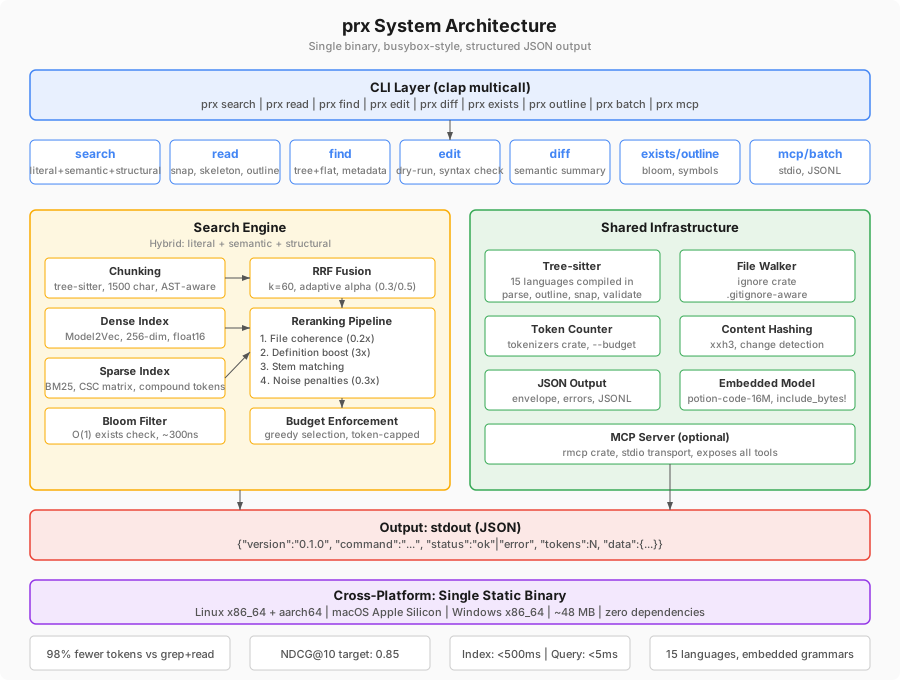
Binary Architecture
prx uses clap::Command::multicall(true) to dispatch subcommands. This means the same binary can be invoked as prx search or as a hardlink named prx-search — both routes hit the same handler.
Subcommand dispatch goes through a Rust enum:
#![allow(unused)]
fn main() {
enum Commands {
    Search(SearchArgs),
    Read(ReadArgs),
    Find(FindArgs),
    Edit(EditArgs),
    Diff(DiffArgs),
    // ...
}
}
Each command lives in src/commands/ as its own module. Shared infrastructure lives in the src/ root modules, imported by any command that needs it.
Module Layout
src/
├── main.rs              # CLI entry point, clap dispatch
├── lib.rs               # Library surface (public API)
├── output.rs            # JSON envelope, error formatting
├── tokens.rs            # Token counting (tokenizers crate)
├── hash.rs              # Content hashing (xxh3)
├── walk.rs              # File walking (ignore crate)
├── workspace.rs         # Shared utilities
├── fallback.rs          # Graceful fallback to Unix tools
│
├── commands/            # Subcommand handlers
│   ├── search.rs        # prx search
│   ├── read.rs          # prx read
│   ├── find.rs          # prx find
│   ├── edit.rs          # prx edit
│   ├── diff.rs          # prx diff
│   ├── batch.rs         # prx batch
│   ├── context.rs       # prx context
│   ├── impact.rs        # prx impact
│   ├── index.rs         # prx index
│   ├── init.rs          # prx init
│   ├── mcp.rs           # prx mcp
│   ├── outline.rs       # prx outline
│   ├── exists.rs        # prx exists
│   ├── stats.rs         # prx stats
│   └── run.rs           # prx run
│
├── search/              # Search engine
│   ├── fusion.rs        # RRF fusion, adaptive alpha
│   ├── graph.rs         # Import graph
│   ├── semantic.rs      # Model2Vec embedding search
│   ├── literal.rs       # Regex/literal search
│   ├── structural.rs    # ast-grep pattern search
│   ├── tokenize.rs      # Identifier tokenization
│   └── symbols.rs       # Symbol index
│
├── chunking/            # Code chunking
│   └── treesitter.rs    # Tree-sitter AST chunking
│
├── ranking/             # Result ranking
│   ├── boosting.rs      # Definition boost, stem matching, coherence
│   ├── penalties.rs     # Noise penalties, saturation decay
│   ├── proximity.rs     # Import graph proximity boost
│   └── weighting.rs     # Alpha weight resolution
│
├── index/               # Index management
│   ├── dense.rs         # Model2Vec embeddings
│   ├── sparse.rs        # BM25 sparse matrix
│   └── bloom.rs         # Bloom filter for exists
│
├── parsing/             # Tree-sitter integration
│   ├── imports.rs       # Import extraction (10 language families)
│   ├── languages.rs     # Language detection, grammar loading
│   ├── outline.rs       # Symbol extraction
│   ├── snap.rs          # Structural snapping
│   └── strip.rs         # Comment stripping
│
└── runner/              # prx run parsers
    ├── mod.rs           # Runner framework, tool detection
    ├── cargo_test.rs
    ├── pytest.rs
    ├── go_test.rs
    └── ...              # 22 parsers total
Shared Infrastructure
Tree-sitter Parsing (src/parsing/)
AST parsing for 15 languages, with grammars compiled directly into the binary. No runtime grammar loading. Tree-sitter powers chunking, --snap, --skeleton, --outline, syntax validation, structural search, and import extraction. Language grammars are C code compiled via the cc crate at build time.
Token Counting (src/tokens.rs)
Two modes: fast (byte_count / 4) for general use, and exact (cl100k_base tokenizer) when --budget is active. The tokenizer vocabulary is embedded via include_bytes! and loaded lazily on first use. Commands select results greedily until the token budget is exhausted.
JSON Output (src/output.rs)
Every command returns a standardized JSON envelope. Errors go to stdout as structured JSON — never to stderr. The --plain flag bypasses the envelope for human-readable output. Command handlers never write to stdout directly; all output goes through this module.
Content Hashing (src/hash.rs)
xxh3 128-bit hashing via the xxhash-rust crate. Runs at ~30 GB/s, making it cheaper to recompute than to cache. Every response that includes file content includes a hash, enabling agents to skip re-reads when nothing has changed.
File Walking (src/walk.rs)
Built on the ignore crate (from ripgrep). Respects .gitignore and .prxignore. Skips binary files (null byte in first 8KB) and files over 1MB. Used by search, find, and index commands.
Data Flow
A typical search query follows this path:
- CLI parses args, dispatches to
Commands::Search - File walker discovers files, respecting
.gitignore - Tree-sitter chunks each file (1500-char, syntax-aware boundaries)
- If semantic mode: embed chunks via Model2Vec (lookup + mean pool + normalize)
- If semantic mode: embed query, run cosine similarity against chunk vectors
- If literal mode: regex match against chunk text
- BM25 scores computed (if hybrid or sparse mode)
- RRF fusion combines scores from active retrievers
- Reranking pipeline applies boosts and penalties
- Budget enforcement selects top results greedily until token limit is reached
- Results serialized as JSON and written to stdout
Import Graph and Project Intelligence
The import graph (search/graph.rs) captures file-level dependency edges extracted via tree-sitter AST queries across 10 language families. Edges are resolved by suffix matching with proximity-based disambiguation. The graph is persisted as imports.bin.
Two commands consume the import graph:
prx contextassembles a module context package: stats, documentation, entrypoints, file skeletons, and 1-hop import edges.prx impactwalks the import graph backwards to find dependents. Supports symbol-level narrowing.
Both commands work without a persisted index, building the graph on-the-fly with a warning.
MCP Server (src/commands/mcp.rs)
Compiled in by default (controlled by the mcp Cargo feature). Exposes all prx tools as MCP tools over stdio transport using the rmcp crate. Async runtime via tokio, linked only when the mcp feature is active. The core binary without mcp or watch is fully synchronous.
Feature Flags
| Feature | Dependencies | Purpose |
|---|---|---|
default | ["mcp"] | Includes MCP server by default |
mcp | rmcp, tokio | MCP stdio server |
watch | notify, tokio | File watching for persistent index |
Key Architectural Decisions
These decisions are settled. They reflect deliberate tradeoffs, not defaults.
| # | Decision | Rationale |
|---|---|---|
| 1 | Single binary, busybox-style | clap multicall. prx search or hardlink prx-search. Zero install friction — download one file, run it. |
| 2 | Model weights embedded in binary | include_bytes! with float16 potion-retrieval-32M model (~32 MB). No internet required, works in sandboxes and air-gapped environments. |
| 3 | Pure Rust Model2Vec inference | No ONNX Runtime dependency. Inference is tokenize + lookup + mean pool + normalize (~50 lines). ONNX Runtime dropped x86_64 macOS support; pure Rust works everywhere. |
| 4 | JSON output by default | Agents parse structured data, not column-aligned text. --plain flag for human fallback. Errors in stdout, never stderr. |
| 5 | Tree-sitter for structural code parsing | Powers chunking, –snap, –skeleton, –outline, syntax validation, structural search. Import extraction uses tree-sitter AST queries (10 language families). No LSP server required. |
| 6 | Token budgets, not truncation | --budget N returns the best N tokens of results, ranked by relevance. Not head -N arbitrary cutoff. |
| 7 | Dry-run edits by default | prx edit previews changes. --apply commits. Agents see what will change before it happens. |
| 8 | Content hashes in every response | Enables cheap “has this changed?” checks. Eliminates ~50% of redundant file re-reads. |
| 9 | No daemon for basic usage | All commands work statelessly. Optional prx index --watch for warm caching. |
| 10 | 6-stage reranking pipeline | Definition boost, stem matching, file coherence, import graph proximity, noise penalties, saturation decay. Quality comes from ranking, not just retrieval. |
| 11 | BM25 with compound identifier tokenization | camelCase/snake_case splitting without stemming. Code identifiers are semantically distinct — “HTTPResponse” and “HTTP” mean different things. |
| 12 | RRF fusion with adaptive alpha | Symbol queries (Foo::bar) lean BM25 (alpha=0.3). Natural language queries stay balanced (alpha=0.5). Auto-detected. |
| 13 | Parallel indexing via rayon | All 5 indexing stages run in parallel. No shared mutable state, no Arc, no Mutex — pure par_iter on thread-safe immutable data. 7.6x speedup on 10-core (11K files: 410s → 54s). |
| 14 | Zero-copy memory-mapped embeddings | embeddings.bin is mmap’d via memmap2 and cast to &[f32] with bytemuck::cast_slice (zero allocation, zero deserialization). OS page cache keeps index warm across queries. Falls back to owned Array2<f32> if mmap fails. |
Error Handling
All errors are written to stdout as structured JSON:
{
  "version": "0.2.0",
  "command": "read",
  "status": "error",
  "error": {
    "code": "file_not_found",
    "message": "File not found: src/auth.ts",
    "suggestion": "Use `prx find` to discover files."
  }
}
stderr is reserved for RUST_LOG debug logging only. Exit codes: 0 for success, 1 for errors, 2 for usage errors.
When prx fails internally, the fallback system catches the error, runs the equivalent Unix tool, and returns results in the same JSON envelope with "fallback": true.
Search Pipeline
prx uses a hybrid retrieval engine combining three search modes, fused and reranked into a single result set. This page explains how each stage works.
Three Retrieval Modes
Literal (--literal)
Regex matching at ripgrep speed. No embeddings are loaded, no index is consulted. Suitable for exact string or pattern searches where you know what you’re looking for.
Semantic (--semantic)
Full hybrid pipeline: chunk retrieval via BM25 and dense embeddings, RRF fusion, and reranking. Suitable for concept-level queries and natural language descriptions of what you’re looking for.
Structural (--structural)
AST pattern matching via ast-grep. Queries use metavariable syntax — for example, fn $NAME($$$) { $$$ } matches any Rust function. Returns structurally matched AST nodes rather than scored chunks.
Auto-detection
When no mode flag is provided, the query is classified automatically:
- Fewer than 3 tokens, or contains regex metacharacters:
--literal - Contains
$VAR-style metavariables:--structural - Otherwise (natural language words, multi-token phrases):
--semantic
Chunking
Before indexing, source files are split into chunks. Chunking is syntax-aware via tree-sitter, targeting 1500 characters per chunk.
Algorithm:
- Parse the file into an AST using the appropriate tree-sitter grammar.
- Recursively traverse the tree, collecting leaf and intermediate nodes.
- Merge adjacent sibling nodes greedily until the accumulated character count approaches the target.
- When a single node exceeds the target, recurse into its children.
- Emit each accumulated group as a chunk.
Chunks don’t overlap. A character belongs to exactly one chunk. A function is never split unless it exceeds 1500 characters.
Files in unsupported languages fall back to line-based chunking at the same character budget.
Embedding Model (Model2Vec)
Model: potion-retrieval-32M (MinishLab, PCA to 256 dims, float16). Embedded in the binary via include_bytes!. No network access, no filesystem reads at runtime.
This is not a transformer. There’s no forward pass, no attention mechanism, no matrix multiplication through hidden layers. It’s a static embedding table.
Inference pipeline:
- Tokenize the input string against a fixed vocabulary (62,500 tokens).
- Look up each token in a 62,500 × 256 embedding table.
- Mean-pool the resulting vectors into a single 256-dimensional vector.
- L2-normalize the pooled vector.
Because it’s a table lookup followed by averaging, it runs on CPU only and is roughly 500x faster than transformer-based embedding models. No GPU required, no warm-up cost.
BM25
BM25 is a classical information retrieval scoring function. It ranks documents by how often query terms appear in them, adjusted for document length. prx uses Robertson BM25 with k1=1.5, b=0.75.
Code identifiers require special handling because standard word tokenization destroys their semantics.
Compound identifier tokenization:
Identifiers are extracted via regex, then split on camelCase and snake_case boundaries. Both the original compound form and each sub-token are preserved.
getHTTPResponse → ["gethttpresponse", "get", "http", "response"]
No stemming is applied. Code identifiers are semantically distinct — initialize and initial mean different things and shouldn’t be conflated.
Content enrichment:
Before BM25 indexing, each chunk’s text is augmented with:
- The file stem, repeated twice (to increase its term frequency weight)
- The last 3 directory components of the file path
This makes file-name and directory-name terms retrievable via BM25 without separate metadata queries.
Scoring:
BM25 scores are pre-computed and stored in a CSC sparse matrix. At query time, scoring is a slice-and-sum operation: extract the column(s) for query terms, sum the values. No per-query document traversal.
Reciprocal Rank Fusion
RRF (Reciprocal Rank Fusion) is a technique for combining ranked lists from multiple retrieval systems. It’s robust to score scale differences between systems — it only cares about rank position, not raw scores.
Formula:
RRF_score = 1 / (k + rank) where k = 60
Each retrieval system (semantic, BM25) produces an independent ranked list. RRF scores are computed separately for each list, then combined:
final_score = alpha * RRF(semantic) + (1 - alpha) * RRF(bm25)
Adaptive alpha:
alpha = 0.3for symbol-like queries: heavier BM25 weight, since exact identifier matching dominates.alpha = 0.5for natural language queries: balanced weighting.
Symbol detection uses a regex heuristic matching patterns like Foo::bar, _private, getUserById.
Both retrievers fetch top_k * 5 candidates before fusion. The expanded candidate pool is then reranked and trimmed to top_k.
Reranking Pipeline
After RRF fusion, results pass through a 6-stage deterministic reranking pipeline. Stages apply in order.
Stage 1: File Coherence Boost
Files where multiple chunks scored highly get their top chunk boosted. The boost is proportional to the file’s aggregate score relative to the highest-scoring file:
boost = max_score * 0.2 * (file_aggregate / max_file_aggregate)
Stage 2: Definition Boost
Chunks that define a queried symbol receive a score multiplier. Detection uses a keyword list: class, def, fn, func, struct, enum, trait, interface, and equivalents across languages. If the file stem also matches the symbol name, an additional multiplier applies.
For natural language queries: 4x multiplier. For symbol queries: 12x multiplier.
Stage 3: Import Graph Proximity
Files in the dependency neighborhood of top results get an additive boost with hop decay. Uses BFS 2-hop traversal of the import graph. Files 1 hop away get a larger boost than files 2 hops away.
Stage 4: Identifier Stem Matching
Query keywords are matched against file path components (stem and immediate parent directory) via prefix matching. If at least 10% of query keywords match path components, a boost is applied:
boost = max_score * match_ratio * 1.5
Stage 5: Noise Penalties
Certain file categories receive multiplicative score penalties. Penalties compound when multiple conditions apply.
| Category | Multiplier |
|---|---|
| Test files | 0.3x |
| Compat / legacy directories | 0.3x |
| Examples / docs directories | 0.3x |
Re-export barrels (__init__.py, package-info.java) | 0.5x |
TypeScript declaration stubs (.d.ts) | 0.7x |
A file matching both “test” and “compat” receives a combined 0.09x multiplier.
Stage 6: File Saturation Decay
To prevent a single file from dominating results, chunks beyond the first from the same file are penalized during greedy selection:
penalty = 0.5^(n - 1)
The 2nd chunk from a file scores at 0.5x, the 3rd at 0.25x, the 4th at 0.125x.
Symbol Index
The symbol index maps each symbol name to its definition location and reference count. Built at index time from tree-sitter AST queries. At query time, symbol queries bypass the full retrieval pipeline and go directly to the symbol index for definition lookup.
This dramatically improves precision for symbol queries. Symbol NDCG improved from 0.263 to 0.619 after the symbol index was added.
Import Graph
The import graph captures file-level dependency edges extracted via tree-sitter AST queries across 10 language families. Edges are resolved by suffix matching with proximity-based disambiguation. Persisted as imports.bin.
The graph is used in two ways:
- Proximity boost (stage 3 above): files near top results get a score boost
prx impact: reverse dependency analysis walks the graph backwards
Budget Enforcement
After reranking, results are selected greedily in score order until the token budget is exhausted.
Token counting: chunk content length divided by 4 gives a conservative approximation. When --budget is active, the cl100k_base tokenizer provides exact counts.
Results that would exceed the remaining budget are skipped, not truncated. The budget is a hard ceiling on total tokens returned. Paginated retrieval is supported via continuation tokens.
Index Storage
In-memory by default: the index is built on demand at query time. Fast enough for most repositories.
Persistent index: prx index . writes the index to .prx/index/ for large repos or repeated queries. Files written:
chunks.bin— chunk content and metadataembeddings.bin— dense vectors (memory-mapped at query time)sparse.bin— BM25 CSC sparse matrixbloom.bin— bloom filter forprx existssymbols.bin— symbol definition indeximports.bin— import graphmeta.json— version, timestamp, per-file content hashes
Incremental re-indexing: when a file changes, only that file’s chunks are re-embedded and re-scored. The rest of the index is unchanged.
Bloom filter: O(1) existence checks before full index lookup. 2% false positive rate, ~75KB for 50K tokens. “No” from bloom means definitely absent. “Yes” means probably present (confirmed with literal search when --exact is passed).
Run Parsers
prx run <command> wraps CLI tools and returns structured JSON with only actionable information. A passing cargo test suite that produces 50,000 tokens of raw output becomes ~200 tokens through prx. On suites with failures, you get exactly the failures — nothing else.
The Problem
Test runners, build tools, and infrastructure CLIs produce output designed for human eyes. A typical cargo test run on a medium-sized project outputs thousands of lines: test names, timing, progress dots, success messages. An agent running tests needs one thing: what failed and why.
The same applies to kubectl describe, terraform plan, docker build, and npm list. Each tool produces verbose output where the signal is buried in noise.
Architecture
command string → detect_tool() → execute() → parse_output() → JSON envelope
                 ↓                            ↓
              tool name                  ParsedResult {
              (string match)               summary, passed, failed, skipped,
                                           failures: Vec<Diagnostic>,
                                           warnings: Vec<Diagnostic>,
                                           tail: Option<String>
                                         }
detect_tool() matches the command string to a parser name. execute() spawns the process and captures stdout and stderr. parse_output() dispatches to the tool-specific parser. The fallback parser handles unknown commands (truncated tail + exit code).
Detection order matters: more specific patterns must match first. cargo llvm-cov must match before cargo test, and kubectl logs before kubectl.
Run parsers operate on command output (text logs, compiler diagnostics), not source code. Tree-sitter is used elsewhere in prx for code parsing. The one future exception — enriching error locations with function context — is deferred.
Parser Catalog
Test Runners
| Parser | Commands | Extracts | Drops | Savings |
|---|---|---|---|---|
cargo_test | cargo test | pass/fail counts, failed test names and output | passing test lines | 95-99% |
pytest | pytest, python -m pytest | pass/fail/skip counts, failed test names | passing test dots, collection output | 95-99% |
go_test | go test | pass/fail counts, failed test output | passing --- PASS lines | 90-95% |
jest | jest, vitest, npm test | pass/fail/skip counts, failed test output | passing test lines, transform output | 90-95% |
dotnet | dotnet test, dotnet build | CS-prefixed errors/warnings, test failures | restore output, dependency noise | 75-85% |
Build and Lint Tools
| Parser | Commands | Extracts | Drops | Savings |
|---|---|---|---|---|
cargo_build | cargo build, cargo check, cargo clippy | errors and warnings with file:line:col | help text, notes, duplicate messages | 80-90% |
mypy | mypy, python -m mypy | file:line: error: lines, error count | notes without errors, success messages | 50% |
tsc | tsc, npx tsc | TypeScript errors with file:line:col | help suggestions, project config noise | 70-80% |
eslint | eslint | lint errors/warnings with file:line | passing file notifications, fix suggestions | 60-80% |
mvn | mvn, mvnw | compilation errors, Surefire failures, build result | download spam, dependency resolution | 90% |
gradle | gradle, gradlew | FAILED tasks, compile errors, test summary | daemon startup, download progress | 85% |
Coverage Tools
| Parser | Commands | Extracts | Drops | Savings |
|---|---|---|---|---|
cargo_llvm_cov | cargo llvm-cov | coverage summary, low-coverage files | per-line coverage data | 90-95% |
pytest_cov | pytest --cov, coverage report | total %, low-coverage files | per-line miss data, branch detail | 80-90% |
go_cover | go test -cover, go tool cover | total %, per-package coverage | per-line annotations | 70-80% |
jest_cov | jest --coverage, c8, istanbul | total %, uncovered files table | per-line detail, branch maps | 80-90% |
Infrastructure and DevOps
| Parser | Commands | Extracts | Drops | Savings |
|---|---|---|---|---|
terraform | terraform plan, terraform apply | changed resources, plan summary | (known after apply), unchanged attrs | 75-85% |
kubectl | kubectl describe, kubectl get | warning events, non-Ready conditions | normal events, managed fields | 80-90% |
kubectl_logs | kubectl logs, docker logs | ERROR/WARN/FATAL + context, deduped | INFO/DEBUG lines, repeated lines | 70-90% |
docker_build | docker build, docker buildx | failed step + context, image info | layer cache, download progress | 80% |
npm_ls | npm list, npm ls | top-level deps, conflicts, warnings | nested transitive dependencies | 95% |
git_log | git log | compact hash+subject+author table | full messages, diffs, stats | 50-60% |
Fallback
| Parser | Commands | Extracts | Drops | Savings |
|---|---|---|---|---|
fallback | anything else | exit code, truncated tail (last 50-100 lines) | bulk of output | 50-90% |
Tool Detection
detect_tool() matches the command string against a list of patterns in priority order. More specific patterns come first.
#![allow(unused)]
fn main() {
fn detect_tool(command: &str) -> &'static str {
    if command.contains("llvm-cov") { return "cargo_llvm_cov"; }
    if command.starts_with("cargo test") { return "cargo_test"; }
    if command.starts_with("cargo") { return "cargo_build"; }
    if command.starts_with("pytest") { return "pytest"; }
    // ...
    "fallback"
}
}
The detection is string matching, not shell parsing. This is intentional: it’s fast, predictable, and covers the common cases without the complexity of a full shell parser.
JSON Auto-Detection (--auto-json)
Several tools support structured output natively. When --auto-json is passed, prx injects the appropriate JSON flag before running the command:
kubectl get→ adds-o jsonterraform plan→ adds-jsonnpm ls→ adds--jsoneslint→ adds--format jsonmypy→ adds--output json
When the tool produces JSON output, prx parses it structurally instead of using regex. This is more reliable and handles edge cases that regex parsers miss.
If you pass --json yourself in the command, prx detects the JSON response and parses it structurally without needing --auto-json.
Token Savings
On a passing test suite, the savings are dramatic:
cargo teston a 200-test suite: ~50,000 tokens raw → ~200 tokens via prx (99% reduction)pyteston a 500-test suite: ~30,000 tokens raw → ~150 tokens via prx (99.5% reduction)
On a suite with failures, prx returns exactly the failures. A 200-test suite with 3 failures returns the 3 failure messages plus a summary line — typically 300-500 tokens regardless of how many tests passed.
Adding a New Parser
Each parser is a module in src/runner/. To add a parser:
- Create
src/runner/mytool.rswith aparse(output: &str) -> ParsedResultfunction. - Add a detection pattern to
detect_tool()insrc/runner/mod.rs. Place it before any more general patterns it should take priority over. - Register the parser in the dispatch table in
parse_output(). - Add inline tests with at least three cases: all-passing output, output with failures, and an edge case (empty output, mixed warnings, or a tool-specific quirk).
Test fixtures are string literals of representative command output. Keep them short (10-30 lines) — enough to exercise the regex patterns without bloating the test file.
File Layout
src/runner/
├── mod.rs              # detect_tool, parse_output, execute, ParsedResult
├── cargo_build.rs      # cargo build/clippy
├── cargo_llvm_cov.rs   # cargo llvm-cov
├── cargo_test.rs       # cargo test
├── docker_build.rs     # docker build
├── dotnet.rs           # dotnet build/test
├── eslint.rs           # eslint
├── fallback.rs         # unknown commands
├── git_log.rs          # git log
├── go_cover.rs         # go test -cover
├── go_test.rs          # go test
├── gradle.rs           # gradle/gradlew
├── jest.rs             # jest/vitest
├── jest_cov.rs         # jest --coverage / c8
├── kubectl.rs          # kubectl describe/get
├── kubectl_logs.rs     # kubectl/docker logs
├── mvn.rs              # mvn/mvnw
├── mypy.rs             # mypy
├── npm_ls.rs           # npm list/ls
├── pytest.rs           # pytest
├── pytest_cov.rs       # pytest --cov / coverage
├── terraform.rs        # terraform plan/apply
└── tsc.rs              # tsc
Fallback System
prx is a young tool. It will have bugs. When a prx command fails — crash, panic, parse error, unexpected input — the agent’s workflow shouldn’t break.
The fallback system catches internal prx failures, runs the equivalent Unix command, and returns results in the same JSON envelope. The agent sees results, not errors. The failure is logged for debugging.
How It Works
CLI parse → try prx command → success? → output
                             → error?  → run fallback command
                                       → log error to ~/.prx/errors.jsonl
                                       → output fallback result as "ok"
std::panic::catch_unwind wraps the command dispatch. This catches panics (unwrap on None, index out of bounds) in addition to returned errors.
Fallback Output Format
When fallback is used, the envelope looks like:
{
  "version": "0.2.0",
  "command": "search",
  "status": "ok",
  "tokens": 1250,
  "fallback": true,
  "data": {
    "raw": "src/auth.rs:42:fn authenticate(...)\nsrc/auth.rs:55:...\n",
    "source": "grep -rn \"pattern\" path/"
  }
}
status is "ok" because the agent got results. The fallback: true field is informational — the agent can detect it if it wants to, but doesn’t need to.
Fallback Mapping
| prx command | Fallback command | What it returns |
|---|---|---|
prx search "pattern" path/ | grep -rn "pattern" path/ | Raw grep output as data.raw |
prx read file.rs | cat file.rs | Raw file content as data.raw |
prx read file.rs --lines 10-20 | sed -n '10,20p' file.rs | Line range |
prx find path/ | find path/ -type f | File list |
prx find path/ --pattern "*.rs" | find path/ -name "*.rs" -type f | Filtered file list |
prx exists "pattern" path/ | grep -rl "pattern" path/ | File list (non-empty = exists) |
prx outline file.rs | grep -n "fn |struct |impl |enum |trait " file.rs | Rough symbol grep |
prx diff | git diff | Raw git diff output |
prx run <cmd> | <cmd> | Raw command output |
Commands Without Fallback
Some commands have no Unix equivalent, or are destructive enough that falling back silently would be wrong.
| Command | Reason |
|---|---|
prx edit --apply | Destructive. Never fall back to sed on a write operation. |
prx mcp | No Unix equivalent. |
prx init | No Unix equivalent. |
prx stats | No Unix equivalent. |
prx bench | No Unix equivalent. |
prx index | No Unix equivalent. |
prx batch | Per-command fallback within batch (each command falls back independently). |
For these commands, errors are returned as-is in the standard error envelope.
Error Logging
Every fallback appends a record to ~/.prx/errors.jsonl:
{
  "ts": 1747500000,
  "command": "search",
  "args": ["search", "pattern", "src/"],
  "error": "thread panicked at src/search/fusion.rs:42",
  "fallback_cmd": "grep -rn pattern src/",
  "fallback_bytes": 4500
}
This log is the primary debugging tool for prx failures. prx stats can show fallback rates. The log file grows unboundedly — clear it manually if needed.
Implementation
The fallback module lives at src/fallback.rs. It exposes three functions:
can_fallback(command: &str) -> bool— returns true for commands with Unix equivalentsrun_fallback(command: &str, args: &Commands) -> Option<serde_json::Value>— runs the fallback and returns the resultlog_error(...)— appends to~/.prx/errors.jsonl
The fallback is invoked from main.rs, not from inside command handlers. This means the fallback catches any failure in the command, including failures in shared infrastructure (chunking, embedding, ranking).
Design Goals
The fallback system has four goals:
- Zero agent disruption — a prx failure produces the same shaped output as a prx success.
- Error capture — every fallback logs the error, the command that failed, the fallback command used, and a timestamp.
- Real-world baseline data — fallback results are raw Unix tool output, which gives actual baseline token counts. Both the fallback bytes and what prx would have returned (0, since it failed) are logged.
- Transparency — the JSON envelope includes
"fallback": trueso the agent can detect it if it wants to.
Indexing Performance
Parallel indexing: 7.6x speedup
prx index builds a persistent search index in a single parallel pass. All five stages run on all available CPU cores via rayon:
- Read, hash, and chunk files
- Build BM25 sparse index
- Compute semantic embeddings
- Extract import graph from AST
- Build symbol index
No shared mutable state, no Arc, no Mutex. Pure par_iter on thread-safe immutable data. BLAS thread limits prevent oversubscription.
Benchmark results
Measured on 10-core Apple Silicon (944% CPU utilization):
| Codebase | Language | Files | Chunks | Time |
|---|---|---|---|---|
| Flask | Python | 259 | 1,225 | 0.3s |
| ripgrep | Rust | 239 | 2,465 | 0.6s |
| fastify | TypeScript | 417 | 2,529 | 0.6s |
| cargo | Rust | 2,815 | 12,118 | 5s |
| terraform | Go | 5,323 | 22,798 | 10s |
| django | Python | 5,690 | 30,944 | 32s |
| kafka | Java | 7,231 | 63,740 | 114s |
| vscode | TypeScript | 14,643 | 136,056 | 340s |
On CI runners with 4 cores, expect ~3-4x speedup over sequential. On a single core, indexing is still correct but slower.
Incremental rebuilds
prx index tracks file hashes and skips unchanged files. Only files that have changed since the last index run are re-processed. For a codebase where 10% of files changed, an incremental rebuild takes roughly 10% of the full rebuild time.
Zero-copy memory-mapped embeddings
Embedding vectors are stored in embeddings.bin and memory-mapped via memmap2. They’re cast to &[f32] with bytemuck::cast_slice: zero allocation, zero deserialization. The OS page cache keeps the index warm across queries.
On an 11K-file codebase with 54 MB of embeddings:
- Zero bytes allocated for embedding data (OS manages the pages)
- Queries after the first hit warm cache, sub-millisecond embedding access
- Falls back to owned
Array2<f32>automatically if mmap isn’t available (network FS, etc.)
The Embeddings enum abstracts both paths behind a single view() -> ArrayView2<f32> API, so the rest of the search pipeline doesn’t need to know which path is active.
bench-ndcg: 55x speedup with load-once
prx bench-ndcg measures search quality (NDCG@10) against labeled datasets. It loads the index once and runs all queries against cached data:
| Benchmark | Before (v0.5.5) | After (v0.5.6) | Speedup |
|---|---|---|---|
| 50-query NDCG suite | 12.76s | 0.23s | 55x |
The speedup comes from loading the index once per benchmark run instead of once per query. The index load dominates query time on warm cache.
Index location and caching
The index is stored in .prx/index/ in the project root. It’s safe to add .prx/ to .gitignore.
On CI, you can cache .prx/index/ between runs. The index is invalidated automatically when files change (via content hashing), so stale cache entries are never used.
See also: index command, Public Benchmark Suite
Search Quality
What NDCG@10 means
NDCG (Normalized Discounted Cumulative Gain) at rank 10 measures how well a search system ranks relevant results in the top 10 positions. A score of 1.0 means every relevant result is at the top. A score of 0.0 means no relevant results appear in the top 10.
For code search, a query like “authentication middleware” has a set of ground-truth relevant files. NDCG@10 measures whether those files appear near the top of prx’s results.
The metric is standard in information retrieval research. It penalizes relevant results that appear lower in the ranking more than those that appear at the top.
Benchmark results (v0.5.7)
200 labeled queries across 8 public repositories, 6 languages, 3 size tiers. All repos pinned by commit SHA. Ground truth in benchmarks/repos/.
| Repo | Language | Files | NDCG@10 | Symbol | Semantic |
|---|---|---|---|---|---|
| Flask | Python | 259 | 0.710 | 0.805 | 0.662 |
| ripgrep | Rust | 239 | 0.493 | 0.810 | 0.356 |
| fastify | TypeScript | 417 | 0.432 | 0.822 | 0.321 |
| cargo | Rust | 2,815 | 0.379 | 0.705 | 0.285 |
| kafka | Java | 7,231 | 0.354 | 0.934 | 0.191 |
| django | Python | 5,690 | 0.262 | 0.495 | 0.211 |
| terraform | Go | 5,323 | 0.287 | 0.238 | 0.319 |
| vscode | TypeScript | 14,643 | 0.208 | 0.639 | 0.080 |
Summary by size tier:
| Tier | Avg NDCG@10 |
|---|---|
| Small (< 500 files) | 0.545 |
| Medium (500-10K files) | 0.332 |
| Large (> 10K files) | 0.248 |
| Overall | 0.391 |
| Symbol search avg | 0.681 |
| Semantic search avg | 0.303 |
Symbol vs semantic analysis
Symbol search is consistently strong (avg 0.681) across all codebase sizes. When you search for a known identifier, function name, or type name, prx finds it reliably.
Semantic search degrades at scale. The 32M embedded model (potion-retrieval-32M) works well on codebases under ~3K files. On larger codebases, the embedding space becomes crowded and relevance scores compress. The vscode semantic score (0.080) reflects this limitation clearly.
The hybrid search combines both: symbol search anchors precision, semantic search adds recall for natural language queries. The combined NDCG@10 is consistently better than either alone.
Known limitations
Semantic search at scale. The embedded 32M-parameter model is optimized for speed and binary size, not maximum retrieval quality. On codebases with 10K+ files, semantic search quality drops significantly. For large repos, use --literal for known identifiers and rely on symbol search.
Architecture queries on large repos. The architecture_ndcg10 scores in the benchmark data show 0.000 for kafka, django, and vscode. High-level architectural queries (“where is the plugin system?”) are hard for any embedding model on large codebases.
Import graph coverage. Import extraction covers 10 language families via tree-sitter AST queries. Languages outside this set don’t get proximity boosting. The graph is also a best-effort extraction: dynamic imports, conditional imports, and generated code may not be captured.
Planned improvements
Code-specific model tiers are planned for v0.6.0. A larger model (or a model fine-tuned on code) would improve semantic search quality on large codebases without changing the binary’s offline/no-server design.
These are honest numbers on codebases we didn’t write and don’t tune for. The benchmark dataset and methodology are public so you can verify them independently.
See also: Public Benchmark Suite, Indexing Performance
Public Benchmark Suite
Overview
The prx benchmark suite measures search quality (NDCG@10) across 200 labeled queries on 8 public repositories. It’s designed to be reproducible, honest, and runnable by anyone.
- 200 queries across 8 repos
- 6 languages: Python, Rust, TypeScript, Java, Go
- 3 size tiers: small (< 500 files), medium (500-10K files), large (> 10K files)
- All repos pinned by commit SHA
- Ground truth in
benchmarks/repos/
Running the benchmark
# Run against the standard dataset
prx bench-ndcg benchmarks/dataset.json

# Human-readable output
prx bench-ndcg benchmarks/dataset.json --plain
The benchmark loads the index once and runs all queries against cached data. A 50-query suite runs in 0.23 seconds.
Dataset format
The dataset is a JSON file with labeled queries:
{
  "repo": "pallets/flask",
  "commit": "abc123...",
  "queries": [
    {
      "query": "request context handling",
      "relevant_files": [
        "src/flask/ctx.py",
        "src/flask/globals.py"
      ],
      "query_type": "semantic"
    }
  ]
}
Each query has a set of ground-truth relevant files. NDCG@10 measures how well prx ranks those files in the top 10 results.
Interpreting results
The output reports NDCG@10 per repo and overall, broken down by search mode:
{
  "repo": "flask",
  "queries": 25,
  "ndcg10": 0.710,
  "symbol_ndcg10": 0.805,
  "semantic_ndcg10": 0.662,
  "misses": 0
}
ndcg10: hybrid search (the default)symbol_ndcg10: literal/symbol search onlysemantic_ndcg10: semantic search onlymisses: queries where no relevant file appeared in the top 10
A miss means the relevant file wasn’t in the top 10 at all. Misses are the most actionable signal for improving search quality.
v0.5.7 results
| Repo | Language | Size | Files | NDCG@10 | Misses |
|---|---|---|---|---|---|
| Flask | Python | small | 259 | 0.710 | 0 |
| ripgrep | Rust | small | 239 | 0.493 | 4 |
| fastify | TypeScript | small | 417 | 0.432 | 5 |
| cargo | Rust | medium | 2,815 | 0.379 | 7 |
| kafka | Java | medium | 7,231 | 0.354 | 11 |
| django | Python | medium | 5,690 | 0.262 | 9 |
| terraform | Go | large | 5,323 | 0.287 | 9 |
| vscode | TypeScript | large | 14,643 | 0.208 | 16 |
Overall average: 0.391. Symbol search average: 0.681.
CI regression gate
The benchmark suite runs in CI on every release. A regression in NDCG@10 of more than 0.02 on any repo blocks the release.
To run the CI check locally:
prx bench-ndcg benchmarks/dataset.json --threshold 0.02
Returns exit code 0 if no regression, exit code 1 if any repo regressed beyond the threshold.
Adding queries
To add queries to the dataset, add entries to the relevant repo’s query list in benchmarks/repos/<repo>/queries.json. Each query needs:
- A natural language query string
- A list of ground-truth relevant files (relative paths)
- A query type (
semantic,symbol, orarchitecture)
Ground truth is determined by human judgment: which files would a developer actually want to find for this query?
See also: Search Quality, Indexing Performance
CLI Reference
This page documents all prx subcommands, flags, and arguments. Flags and behavior may change between minor versions. Use prx --version and the JSON output version field for programmatic detection.
Global Flags
These flags apply to all subcommands.
| Flag | Description |
|---|---|
--json | JSON output (default) |
--plain | Human-readable plain text output |
--budget N | Maximum tokens in response (default: unlimited) |
--version | Print version and exit |
--help | Print help and exit |
-q, --quiet | Suppress non-essential output |
Exit Codes
| Code | Meaning |
|---|---|
0 | Success |
1 | Error (details in stdout JSON) |
2 | Usage error (invalid arguments) |
prx search
Search the codebase by query.
prx search <query> [path]
| Argument | Description |
|---|---|
query | Search query (required) |
path | Root path to search (default: .) |
| Flag | Description |
|---|---|
--literal | Force literal/regex matching |
--semantic | Force semantic search |
--structural | Force ast-grep structural matching |
--mode hybrid|semantic|bm25|literal|structural | Explicit mode selection (default: auto-detect) |
--top-k N | Number of results (default: 5) |
--budget N | Token budget for results |
--context function|class|block|none | Return enclosing structural unit (default: none) |
--exists | Bloom filter quick check — returns {"exists": true/false} only |
--continue TOKEN | Resume paginated results |
--alpha FLOAT | Override RRF alpha weight (0.0 = pure BM25, 1.0 = pure semantic) |
Auto-detection: when no mode flag is provided, the query is classified automatically. Fewer than 3 tokens or regex metacharacters → --literal. Contains $VAR-style metavariables → --structural. Otherwise → --semantic.
prx read
Read file content with optional range and structural expansion.
prx read <file> [flags]
| Argument | Description |
|---|---|
file | File path (required) |
| Flag | Description |
|---|---|
--lines START-END | Line range, 1-indexed, inclusive |
--snap function|class|block | Expand range to enclosing structure |
--skeleton | Return signatures, types, and exports only |
--outline | Return symbol table (name, kind, line range, signature) |
--hash | Return content hash only (for change detection) |
--if-changed HASH | Return 48-token stub if file hash matches (skip re-read) |
--mode aggressive|diff|entropy | Content reduction mode |
--budget N | Maximum tokens of file content |
--meta | Include file metadata (language, lines, bytes, modified timestamp) |
Read modes:
--mode aggressive— strip comments and collapse blank lines (1-19% savings)--mode diff— changed lines vs git HEAD only (80-97% savings on modified files)--mode entropy— filter repetitive/generated code (5-87% savings)
prx find
List and filter files in the workspace.
prx find [path] [flags]
| Argument | Description |
|---|---|
path | Root path (default: .) |
| Flag | Description |
|---|---|
--pattern GLOB | Filter by glob pattern (e.g., *.ts) |
--depth N | Maximum directory depth (default: unlimited) |
--related-to QUERY | Semantic relevance scoring for files |
--changed-since REF | Files modified since git ref or timestamp |
--outline | Include per-file symbol counts |
--tree | Tree output only (no flat list) |
--flat | Flat list only (no tree) |
--budget N | Token budget |
prx edit
Find and replace content in a file. Dry-run by default.
prx edit <file> --find STRING --replace STRING [flags]
| Argument | Description |
|---|---|
file | File path (required) |
| Flag | Description |
|---|---|
--find STRING | Text to find (literal by default) |
--replace STRING | Replacement text |
--regex | Interpret --find as regex |
--apply | Apply changes to file (default: dry-run preview) |
--in-function NAME | Scope replacement to named function |
--in-class NAME | Scope replacement to named class |
--all | Replace all occurrences (default: first only) |
--syntax-check | Validate syntax after edit (default: true) |
--find and --replace can be specified multiple times. All replacements are applied atomically.
prx diff
Show git diffs with token-aware truncation.
prx diff [file] [flags]
| Argument | Description |
|---|---|
file | File path (optional, default: all changed files) |
| Flag | Description |
|---|---|
--since REF | Compare against git ref (default: HEAD) |
--staged | Compare staged changes |
--stat-only | Summary and stats only (~30 tokens) |
--budget N | Token budget for hunks |
--functions | Group hunks by function |
prx index
Build or update the search index.
prx index [path] [flags]
| Argument | Description |
|---|---|
path | Root path to index (default: .) |
| Flag | Description |
|---|---|
--watch | Watch for file changes and re-index |
--rebuild | Force full re-index |
--stats | Print index statistics |
The index is written to .prx/index/. Subsequent searches use the cached index automatically.
prx outline
Print the symbol table for a file or directory.
prx outline <file|dir> [flags]
| Argument | Description |
|---|---|
file|dir | File or directory path (required) |
| Flag | Description |
|---|---|
--depth N | For directories, max depth |
--kind function|class|method|all | Filter by symbol kind |
prx exists
Probabilistic existence check for a pattern.
prx exists <pattern> [path]
| Argument | Description |
|---|---|
pattern | Pattern to check (required) |
path | Root path (default: .) |
Returns {"exists": true/false, "confidence": "exact"|"probable"}.
Uses a bloom filter for O(1) probable check. Falls back to literal search for exact confirmation when --exact is passed.
prx run
Run a command and return structured output with only actionable items.
prx run <command> [flags]
| Argument | Description |
|---|---|
command | Command to run (required, captures all remaining args) |
| Flag | Description |
|---|---|
--raw | Bypass parsing, return full output |
--full | Return parsed summary AND full output |
--auto-json | Inject JSON flags for tools that support structured output |
--budget N | Token budget for output |
--timeout N | Command timeout in seconds (default: 300) |
Auto-detects the tool from the command string and applies tool-specific parsing. Unknown commands fall back to exit code + last N lines. See Run Parsers for the full parser catalog.
prx batch
Execute multiple commands in parallel from stdin.
prx batch
Reads JSONL from stdin. Each line is a command object. Executes commands in parallel. Writes JSONL to stdout, one result per line, in input order.
Input format:
{"cmd": "search", "query": "auth", "budget": 300}
{"cmd": "read", "file": "src/auth.ts", "id": "q2"}
The optional "id" field is echoed in the output line for request correlation.
prx context
Assemble a context package for a module or directory.
prx context <path> [flags]
Returns stats, documentation, entrypoints, file skeletons, and 1-hop import edges in a single call. Uses the symbol index for entrypoint ranking.
prx impact
Reverse dependency analysis.
prx impact <file> [flags]
| Flag | Description |
|---|---|
--symbol NAME | Narrow analysis to a specific symbol |
Walks the import graph backwards to find all files that depend on the given file or symbol.
prx mcp
Start the MCP server on stdio.
prx mcp
No arguments. Exposes all prx tools as MCP tools. Designed for agent framework integration. See the integration guide for configuration.
prx init
Generate integration files for agent frameworks.
prx init [flags]
| Flag | Description |
|---|---|
--agent FRAMEWORK | Target framework: claude-code, cursor, codex, opencode, all |
--agents-md | Append prx usage snippet to AGENTS.md in current directory |
Without flags, auto-detects installed frameworks and writes appropriate configs.
| Framework | File Written | Content |
|---|---|---|
| Claude Code | .claude/agents/ag-search.md | Dedicated search sub-agent definition |
| Claude Code | Runs claude mcp add ag | MCP server registration |
| Cursor | .cursor/mcp.json | MCP server entry |
| Codex | ~/.codex/config.toml | MCP server entry |
| OpenCode | ~/.opencode/config.json | MCP server entry |
| Any | Appends to AGENTS.md | Usage snippet with workflow guidance |
prx stats
Print token savings dashboard.
prx stats [flags]
| Flag | Description |
|---|---|
--verbose | Per-command breakdown |
--reset | Clear saved statistics |
Environment Variables
| Variable | Default | Description |
|---|---|---|
PRX_MAX_FILE_SIZE | 1MB | Maximum file size to process |
PRX_CHUNK_SIZE | 1500 | Chunk target in characters |
RUST_LOG | — | Debug logging level (output goes to stderr) |
Ignore Files
prx respects .gitignore by default. Add a .prxignore file alongside .gitignore for prx-specific exclusions. The format is identical to .gitignore.
JSON Output Format
All prx output is JSON by default. Every response uses a common envelope. This page documents the envelope, error format, per-command data schemas, and error codes.
Use --plain for human-readable output. Use --budget N to cap token usage.
Common Envelope
Every response uses this structure. status is "ok" or "error".
{
  "version": "0.2.0",
  "command": "search",
  "status": "ok",
  "tokens": 487,
  "data": {}
}
| Field | Type | Description |
|---|---|---|
version | string | prx version (semver). Use this for programmatic compatibility detection. |
command | string | Subcommand that produced this response. |
status | string | "ok" or "error". |
tokens | number | Estimated token count of the entire JSON response (envelope + data). |
data | object | Command-specific payload. Absent on error. |
Token counting: uses byte_count / 4 when --budget is not specified, exact cl100k_base count when --budget is active.
Error Envelope
On error, data is absent and error is present.
{
  "version": "0.2.0",
  "command": "read",
  "status": "error",
  "error": {
    "code": "file_not_found",
    "message": "File not found: src/auth.ts",
    "suggestion": "Check the file path. Use `prx find` to discover files."
  }
}
| Field | Type | Description |
|---|---|---|
error.code | string | Stable machine-readable error code. |
error.message | string | Human-readable description. |
error.suggestion | string | Optional. Actionable recovery hint. |
Errors always go to stdout. stderr is reserved for RUST_LOG debug logging only.
Fallback Envelope
When prx fails internally and falls back to a Unix tool, the envelope includes "fallback": true:
{
  "version": "0.2.0",
  "command": "search",
  "status": "ok",
  "tokens": 1250,
  "fallback": true,
  "data": {
    "raw": "src/auth.rs:42:fn authenticate(...)\n",
    "source": "grep -rn \"pattern\" path/"
  }
}
prx search
{
  "data": {
    "matches": [
      {
        "file": "src/auth.ts",
        "line": 42,
        "column": 7,
        "match": "verifyToken",
        "context_type": "function",
        "context_name": "verifyToken",
        "context_signature": "async function verifyToken(token: string): Promise<User>",
        "snippet": "export async function verifyToken(token: string): Promise<User> {\n  ...\n}",
        "relevance": 0.94,
        "language": "typescript"
      }
    ],
    "total_matches": 7,
    "returned": 1,
    "budget_used": 612,
    "truncated": true,
    "continuation_token": "eyJvZmZzZXQiOjF9"
  }
}
With --exists: data contains only exists (bool) and confidence ("exact" or "probable").
To fetch the next page, pass --continue <continuation_token>.
prx read
{
  "data": {
    "file": "src/auth.ts",
    "meta": {
      "language": "typescript",
      "lines": 198,
      "bytes": 5421,
      "modified": 1747526400,
      "hash": "a3f1c9e2b84d7f0e1c2a9b3d5e7f8a1b2c4d6e8f"
    },
    "content": {
      "range": { "start": 1, "end": 198 },
      "snap": null,
      "snap_reason": null,
      "text": "import jwt from 'jsonwebtoken';\n...",
      "tokens": 1043
    },
    "outline": [
      {
        "name": "verifyToken",
        "kind": "function",
        "lines": { "start": 42, "end": 55 },
        "signature": "async function verifyToken(token: string): Promise<User>"
      }
    ]
  }
}
outline is included by default alongside content. One call returns content, symbol table, metadata, and hash.
--skeleton replaces function bodies with // .... --outline nulls data.content. --hash nulls both data.content and data.outline.
snap is a label when the file was too large and a section was selected (e.g., "top_of_file"). snap_reason explains why.
prx find
{
  "data": {
    "tree": {
      "src": {
        "auth.ts": { "lines": 198, "symbols": 12, "language": "typescript" },
        "middleware": {
          "cors.ts": { "lines": 34, "symbols": 3, "language": "typescript" }
        }
      }
    },
    "flat": [
      {
        "path": "src/auth.ts",
        "lines": 198,
        "symbols": 12,
        "language": "typescript",
        "relevance": 0.91
      }
    ],
    "stats": {
      "total_files": 47,
      "returned": 2,
      "budget_used": 204
    }
  }
}
--tree nulls data.flat. --flat nulls data.tree. Default populates both. relevance is null when no --related-to query was provided.
prx edit
{
  "data": {
    "file": "src/auth.ts",
    "dry_run": false,
    "changes": [
      {
        "line": 44,
        "function": "verifyToken",
        "before": "  const decoded = jwt.verify(token, process.env.JWT_SECRET);",
        "after": "  const decoded = jwt.verify(token, config.jwtSecret);"
      }
    ],
    "total_replacements": 1,
    "syntax_valid": true,
    "syntax_error": null
  }
}
dry_run: true means no file was written. syntax_error is a string when syntax_valid is false.
prx diff
{
  "data": {
    "summary": "Replaced hardcoded JWT secret with config lookup in verifyToken",
    "stats": {
      "additions": 2,
      "deletions": 1,
      "files_changed": 1,
      "functions_changed": ["verifyToken"]
    },
    "semantic_notes": ["No signature changes", "New import: config"],
    "hunks": [
      {
        "file": "src/auth.ts",
        "function": "verifyToken",
        "old_range": { "start": 44, "end": 44 },
        "new_range": { "start": 44, "end": 45 },
        "changes": [
          { "type": "deletion", "old": "  const decoded = ...", "new": null },
          { "type": "addition", "old": null, "new": "  const decoded = ..." }
        ]
      }
    ]
  }
}
--stat-only nulls data.hunks. change.type is "modification" when both old and new are present.
prx outline
{
  "data": {
    "file": "src/auth.ts",
    "language": "typescript",
    "symbols": [
      {
        "name": "AuthService",
        "kind": "class",
        "lines": { "start": 60, "end": 140 },
        "signature": "class AuthService",
        "children": [
          {
            "name": "login",
            "kind": "method",
            "lines": { "start": 65, "end": 88 },
            "signature": "async login(email: string, password: string): Promise<Session>",
            "children": []
          }
        ]
      }
    ]
  }
}
kind is one of: function, class, method, struct, enum, trait, type, const. children is always an array.
prx index
{
  "data": {
    "path": "/project/src",
    "files_indexed": 47,
    "chunks": 312,
    "duration_ms": 1840,
    "languages": { "typescript": 38, "json": 6, "markdown": 3 }
  }
}
prx exists
{
  "data": {
    "exists": false,
    "confidence": "exact",
    "pattern": "src/payments/stripe.ts"
  }
}
confidence is "exact" for literal path lookups and confirmed literal searches. "probable" for bloom filter results that haven’t been confirmed.
prx stats
{
  "data": {
    "periods": [
      { "label": "last_hour",  "calls": 14,   "tokens_saved": 18420,   "savings_percent": 73.4 },
      { "label": "last_24h",   "calls": 89,   "tokens_saved": 104300,  "savings_percent": 68.1 },
      { "label": "all_time",   "calls": 1204, "tokens_saved": 1382900, "savings_percent": 71.2 }
    ]
  }
}
prx batch
Output is JSONL: one complete envelope per line, in input order. Each line is self-contained.
{"version":"0.2.0","command":"search","status":"ok","id":"q1","tokens":612,"data":{...}}
{"version":"0.2.0","command":"read","status":"error","id":"q2","error":{"code":"file_not_found","message":"File not found: src/payments/stripe.ts","suggestion":"Check the file path. Use `prx find` to discover files."}}
Input commands with an "id" field have it echoed in their output line.
Error Codes
| Code | Meaning |
|---|---|
file_not_found | Path does not exist or is not readable |
parse_error | File could not be parsed for the requested language |
budget_exceeded | Request would exceed the token budget |
invalid_range | Line range is out of bounds for the file |
index_missing | No index found for the requested path |
invalid_command | Unrecognized subcommand in a batch request |
syntax_error | Edit produced syntactically invalid output |
permission_denied | File exists but cannot be read or written |
Platform Support
prx is a single static binary with no runtime dependencies. It works on Linux, macOS, and Windows without installation, configuration, or internet access.
Supported Targets
| Target | Tier | CI Runner |
|---|---|---|
| Linux x86_64 (glibc) | 1 | ubuntu-latest |
| Linux aarch64 (glibc) | 1 | ubuntu-latest (cross) |
| macOS aarch64 (Apple Silicon) | 1 | macos-latest |
| Windows x86_64 (MSVC) | 1 | windows-latest |
| macOS x86_64 (Intel) | 2 | macos-13 |
| Linux x86_64 (musl, static) | 2 | ubuntu-latest (cross) |
Tier 1 targets are tested on every commit. Tier 2 targets are tested on releases.
Why Pure Rust (No ONNX, No Python)
The embedding model (potion-retrieval-32M) is embedded directly in the binary. Inference runs in pure Rust: tokenize, lookup, mean pool, normalize. About 50 lines of code.
The alternative was ONNX Runtime via the ort crate. That was rejected for two reasons:
- ONNX Runtime 1.24.1 dropped x86_64 macOS support (a Microsoft decision), which would have eliminated Tier 2 Intel Mac coverage.
ort2.0 requires pre-built ONNX Runtime binaries, adding a runtime dependency that breaks the “download one file, run it” promise.
Model2Vec inference is not a neural network in the transformer sense. There’s no forward pass, no attention mechanism. It’s a table lookup followed by averaging — fast enough on CPU, no GPU required.
Dependency Audit
| Crate | Pure Rust? | Build Requirement | Platform Notes |
|---|---|---|---|
| clap | Yes | None | |
| tree-sitter | No | C compiler (cc crate) | Pinned to 0.25.x for grammar crate compatibility. Language grammars are C compiled into binary. All CI runners have C compilers. Windows needs MSVC or MinGW. |
| ast-grep-core | Yes | None | |
| safetensors | Yes | None | Zero-copy mmap |
| ndarray | Yes | None | BLAS optional, not used |
| sprs | Yes | None | Sparse matrices |
| tokenizers | Mostly | None | HuggingFace tokenizer, pure Rust |
| similar | Yes | None | Diff algorithms |
| bloomfilter | Yes | None | |
| serde + serde_json | Yes | None | |
| xxhash-rust | Yes | None | xxh3 feature |
| ignore | Yes | None | From ripgrep, battle-tested everywhere |
| regex | Yes | None | Literal search and identifier extraction |
| thiserror | Yes | None | |
| anyhow | Yes | None | |
| rmcp | Yes | None | Official MCP SDK. Stdio works on Windows via tokio |
| notify | Yes | None | Linux=inotify, macOS=FSEvents, Windows=ReadDirectoryChangesW |
The only non-pure-Rust dependency is tree-sitter, which requires a C compiler at build time. All CI runners have one. The compiled grammars are statically linked into the binary — no C runtime dependency at runtime.
Tree-sitter Grammar Compatibility
All grammars are pinned to tree-sitter 0.25.x. This version was chosen because it has the broadest grammar crate compatibility — only 1 of 15 grammar crates supports 0.26.x, while all support 0.25.x.
Supported languages (15 grammars compiled into the binary):
Rust, Python, JavaScript, TypeScript, TSX, Go, Java, C, C++, Ruby, Bash, JSON, TOML, YAML, HTML, CSS
Additional grammars can be added as crate dependencies. The grammar crate must be compatible with tree-sitter 0.25.x.
Cross-Compilation
| From → To | Works? | Method |
|---|---|---|
| Linux x86_64 → Linux aarch64 | Yes | cross build --target aarch64-unknown-linux-gnu |
| Linux x86_64 → Windows | Yes | cross build --target x86_64-pc-windows-gnu |
| macOS → Linux | Yes | cross build --target x86_64-unknown-linux-gnu |
| macOS → Windows | No | Use GitHub Actions windows-latest runner |
| Any → musl (static) | Yes | cross build --target x86_64-unknown-linux-musl |
Binary Size
| Configuration | Size |
|---|---|
| prx without model | ~15 MB |
| + potion-retrieval-32M float16 | +32 MB = ~47 MB |
| + LTO + strip | ~40 MB |
The model is embedded via include_bytes!. No download needed at runtime.
CI Matrix
| Runner | Target |
|---|---|
| ubuntu-latest | x86_64-unknown-linux-gnu |
| ubuntu-latest (cross) | aarch64-unknown-linux-gnu |
| ubuntu-latest (cross) | x86_64-unknown-linux-musl |
| macos-latest | aarch64-apple-darwin |
| macos-13 | x86_64-apple-darwin |
| windows-latest | x86_64-pc-windows-msvc |
Known Platform-Specific Behavior
File watching (prx index --watch): uses platform-native APIs. Linux uses inotify, macOS uses FSEvents, Windows uses ReadDirectoryChangesW. Behavior is consistent across platforms, but the underlying mechanism differs.
Path separators: prx normalizes path separators internally. JSON output always uses forward slashes, even on Windows.
Binary files: prx skips files with a null byte in the first 8KB. This heuristic works on all platforms.
Large files: files over 1MB are skipped by default. Override with PRX_MAX_FILE_SIZE environment variable.
Competitive Landscape
This page describes the problem prx addresses, the existing tools in this space, and how prx relates to them.
The Problem
AI coding agents waste between 30% and 93% of their token budget on exploration work that produces no code changes. The root cause is a mismatch: Unix tools were designed for human eyes, and agents must re-parse their output to extract structured meaning.
The canonical failure mode is the grep-read-grep loop:
- Agent runs
grepto find a symbol. Gets file paths and line numbers. - Agent runs
caton each file to read context. Gets entire files. - Agent runs
grepagain to narrow down. Gets the same noise.
A single grep-read-grep loop consumes roughly 11,300 tokens, of which about 800 are useful. That’s 93% waste per loop.
The pattern compounds. The SWE-bench token study (arxiv 2604.22750) found that 50% of file reads are re-reads of files the agent already loaded earlier in the session. Context cost grows O(n²) over a session, not O(n), because every new token must attend to every prior token.
From the SWE-chat dataset (355K tool calls), the most-used tools are:
| Tool | Share of calls |
|---|---|
| Read | 19.8% |
| Grep | 10.1% |
| Bash:file | 6.9% |
These three tools account for roughly a third of all agent tool calls. They’re also the tools with the worst token efficiency.
Existing Tools
| Project | Approach | Token Savings | Quality (NDCG@10) | Language | Limitation |
|---|---|---|---|---|---|
| Semble | Hybrid search: embeddings + BM25 + reranking | 98% | 0.854 | Python | Search only. No read, edit, or diff. Python dependency. |
| RTK | Proxy wrapper over existing tools with 60-90% compression | 60-90% | — | — | Wrapper, not replacement. Still spawns shells. No structural awareness. |
| Hypergrep | Indexed daemon with call graphs | 87% | — | Rust | Heavy daemon. Call graphs are Rust-only. Research stage. |
| aict | 22 Go reimplementations of coreutils with JSON/XML output | ~60% | — | Go | MIME detection overhead. Slower than the tools it replaces. |
| instant-grep | Trigram-indexed search | 93.5% | — | — | Search only. |
| LeanCTX | Context compression OS | 99% file read compression | — | — | Compression layer, not native tools. |
| squeez | PreToolUse hook compression | 95% bash reduction | — | — | Post-hoc compression. Doesn’t change the underlying tool calls. |
| FileSift | Semantic file search: BM25 + FAISS | — | — | Python | Search only. Python. Requires indexing step. |
| SWE-agent ACI | Custom commands: search_file, open, edit | — | — | Python | Tightly coupled to SWE-agent. Not standalone. |
Semble’s retrieval quality (NDCG 0.854) is the strongest published number in this space. aict’s philosophy of reimplementing coreutils for structured output is the right instinct, but the Go implementation trades speed for structure in a way that hurts in practice. The compression-layer tools (LeanCTX, squeez, RTK) reduce token counts without changing the underlying access pattern, which limits how far they can go.
LSP vs Grep
A measurement comparing LSP and grep for identical operations found:
- LSP saves 5-34x tokens vs grep for the same code navigation tasks
- LSP rename: 1,441x fewer tokens than the equivalent grep + read + replace sequence
The gap is real. LSP operates on the semantic structure of code rather than its text representation, so it can answer “find all references to this function” in a single round-trip instead of a grep loop.
The catch is setup cost. LSP requires a running language server, per-language configuration, and startup latency. For agents that need to work across polyglot repos or ephemeral environments, that’s a meaningful barrier.
prx occupies the middle ground: structural awareness without a running LSP server. It understands file structure, symbol relationships, and content semantics natively, without requiring language-specific infrastructure.
Where prx Fits
prx is not a wrapper. RTK, squeez, and LeanCTX all sit in front of existing tools and compress their output. prx replaces the tools.
prx is not search-only. Semble, instant-grep, FileSift, and Hypergrep all solve the retrieval problem well. None of them read, edit, or diff files. An agent still needs other tools to act on what it finds.
prx is not Python. Python dependencies add friction in CI, containers, and minimal environments.
prx is a single Rust binary that replaces five core tools (read, grep, find, edit, diff) with native structured output, embedded semantic search, and zero runtime dependencies.
The closest analog is aict: same philosophy of reimplementing coreutils for agent consumption. prx differs in three ways. It’s written in Rust, so it’s faster than the tools it replaces rather than slower. It adds semantic search natively rather than treating retrieval as a separate concern. And it covers the full read-search-edit-diff loop rather than stopping at structured output.
prx uses a similar hybrid retrieval architecture to Semble (embeddings + BM25 + reranking) but is a separate implementation. Semble’s published NDCG of 0.854 is a reference point, not a claim about prx’s quality — prx has not yet run formal NDCG benchmarks against the same datasets.
References
- SWE-bench token study: https://arxiv.org/pdf/2604.22750
- Semble: https://github.com/MinishLab/semble
- RTK: https://github.com/rtk-ai/rtk
- Hypergrep: https://marjoballabani.github.io/hypergrep/
- LSP vs grep measurement: https://dev.to/daynablackwell/we-measured-it-lsp-saves-ai-agents-5-34x-tokens-vs-grep-427
Developer Setup
Prerequisites
| Tool | Version | Install |
|---|---|---|
| Rust | >= 1.85 | curl --proto '=https' --tlsv1.2 -sSf https://sh.rustup.rs | sh |
| C compiler | gcc, clang, or MSVC | Required by tree-sitter grammars at build time |
| Git | >= 2.x | For prx diff and --changed-since |
| Python | >= 3.10 | For model conversion script (float32 → float16) |
Platform-Specific Setup
macOS:
xcode-select --install
Linux (Debian/Ubuntu):
sudo apt install build-essential python3
Windows:
winget install Microsoft.VisualStudio.2022.BuildTools
Quick Start
git clone https://github.com/civitas-io/prx.git
cd prx
make setup
make setup downloads the model files (~35MB), converts the model to float16, and runs a test build. Takes about 2 minutes on first run.
What make setup Does
- Downloads three files into
models/(gitignored):potion-retrieval-32M.safetensors— Model2Vec embedding weights (61MB float32 from HuggingFace, converted to float16)model2vec_tokenizer.json— Model2Vec vocabulary (1MB, 61,826 tokens)cl100k_base.json— cl100k tokenizer for--budgetenforcement (4MB)
- Converts the model from float32 to float16 (61MB → 31MB)
- Builds the debug binary
- Runs unit tests to verify everything works
The model files are embedded into the binary at compile time via include_bytes!. They must be present before cargo build. The models/ directory is gitignored because the files are too large for git.
Build
make build          # debug build (~160MB, fast compile)
make release        # release build (~48MB, slow compile, optimized)
Build Variants
# Without MCP server (drops tokio + rmcp, faster compile)
cargo build --no-default-features

# With MCP server (default)
cargo build

# With file watching for prx index --watch
cargo build --features watch
Build Without Model
If you’re working on commands that don’t use semantic search (edit, diff, run, stats, init), you can skip the model download:
mkdir -p models
touch models/potion-retrieval-32M.safetensors
touch models/model2vec_tokenizer.json
touch models/cl100k_base.json
cargo build --no-default-features
The binary compiles but prx search --semantic won’t produce meaningful results.
Development Workflow
Daily Commands
make check          # fmt + clippy + all tests (run before every commit)
make test           # all tests (unit + E2E)
make test-unit      # unit tests only (fast, ~1s)
make test-e2e       # E2E tests only (slower, ~3s, tests the compiled binary)
Running Individual Tests
cargo test test_literal_search              # by test name
cargo test commands::search                 # by module
cargo test --test e2e search                # E2E tests matching "search"
Debug Logging
RUST_LOG=prx=debug cargo run -- search "test" src/
Log output goes to stderr. stdout is reserved for JSON output.
Pre-Commit Hook
Install the pre-commit hook to run make check automatically before every commit:
cp scripts/pre-commit .git/hooks/pre-commit
chmod +x .git/hooks/pre-commit
The hook runs cargo fmt --check, cargo clippy -- -D warnings, and cargo test. All three must pass before the commit proceeds.
IDE Setup
rust-analyzer works out of the box. No special configuration needed.
For VS Code, install the rust-analyzer extension. For IntelliJ/CLion, install the Rust plugin.
One note: the model files in models/ are large binary files. Some IDEs index everything in the project directory. Add models/ to your IDE’s exclusion list if indexing is slow.
Adding a New Command
- Create
src/commands/new_cmd.rswith an Args struct andrun()function - Add the variant to
Commandsenum insrc/commands/mod.rs - Add dispatch arm in
src/main.rs - Add
name()match insrc/commands/mod.rs - Write unit tests in the module
- Write E2E tests in
tests/e2e.rs - Update
docs/design/CLI.md,docs/design/OUTPUT.md, andAGENTS.md
Adding a New Language Grammar
- Add
tree-sitter-<lang>crate toCargo.toml(must be compatible with tree-sitter 0.25.x) - Add extension mapping in
src/parsing/languages.rs - Add outline test in
src/parsing/outline.rs
Adding a New Run Parser
- Create
src/runner/new_tool.rsimplementingpub fn parse(output: &str) -> ParsedResult - Add module in
src/runner/mod.rs - Add detection pattern in
detect_tool()(more specific patterns before general ones) - Add dispatch in
parse_output() - Add tests with real captured output
Release Process
- Update version in
Cargo.toml - Update
CHANGELOG.md make checkgit commitgit tag v0.X.0git push && git push --tags- GitHub Actions builds release binaries automatically for all 6 targets
Coding Guidelines
These guidelines apply to all code in prx. They’re based on Karpathy’s guidelines for reducing LLM coding mistakes, adapted for this codebase. The goal is fewer unnecessary changes in diffs, fewer rewrites due to overcomplication, and clarifying questions before implementation rather than after mistakes.
Think Before Coding
Don’t assume. Don’t hide confusion. Surface tradeoffs.
- State assumptions explicitly. If uncertain, ask.
- If multiple interpretations exist, present them — don’t pick silently.
- If a simpler approach exists, say so. Push back when warranted.
- If something is unclear, stop. Name what is confusing. Ask.
Simplicity First
Minimum code that solves the problem. Nothing speculative.
- No features beyond what was asked.
- No abstractions for single-use code.
- No “flexibility” or “configurability” that wasn’t requested.
- No error handling for impossible scenarios.
- If you write 200 lines and it could be 50, rewrite it.
The test: would a senior engineer say this is overcomplicated? If yes, simplify.
Surgical Changes
Touch only what you must. Clean up only your own mess.
When editing existing code:
- Don’t “improve” adjacent code, comments, or formatting.
- Don’t refactor things that aren’t broken.
- Match existing style, even if you’d do it differently.
- If you notice unrelated dead code, mention it — don’t delete it.
When your changes create orphans:
- Remove imports/variables/functions that YOUR changes made unused.
- Don’t remove pre-existing dead code unless asked.
Every changed line should trace directly to the request.
Error Handling
Use thiserror for library errors, anyhow for CLI entry points.
// Library errors (thiserror)
#[derive(thiserror::Error, Debug)]
pub enum AgError {
    #[error("file not found: {path}")]
    FileNotFound { path: String },
    #[error(transparent)]
    Io(#[from] std::io::Error),
}

// CLI errors (anyhow)
fn main() -> anyhow::Result<()> {
    let result = do_work().context("failed to process")?;
    Ok(())
}
Never unwrap() in library code. unwrap() and expect() are forbidden outside #[cfg(test)] modules. Use ? propagation with typed errors.
Unsafe is forbidden without explicit justification in a code comment.
Public API Documentation
All public functions and types must have doc comments:
#![allow(unused)]
fn main() {
/// Searches the codebase for chunks matching the query.
///
/// Returns ranked results up to the token budget. If no budget is specified,
/// returns all results above the relevance threshold.
pub fn search(query: &str, path: &Path, opts: SearchOpts) -> Result<Vec<Match>, AgError> {
    // ...
}
}
These doc comments become --help text for clap arguments. Write them for the person reading the help output, not just for rustdoc.
Comments in function bodies should explain WHY, not WHAT. If the code is clear, no comment is needed.
Dependencies
Every new dependency added to Cargo.toml must have a comment explaining why it’s needed and why an existing dependency can’t serve the purpose:
# sprs: sparse matrix operations for BM25 scoring.
# ndarray doesn't support CSC sparse format; sprs is the standard Rust sparse matrix crate.
sprs = "0.11"
Minimize dependencies. A new crate adds compile time, binary size, and supply chain risk. Before adding one, check whether an existing dependency already provides the functionality.
Output
All output must go through the JSON envelope in src/output.rs. Never println!() directly to stdout from command handlers.
Errors go to stdout as structured JSON, never to stderr. stderr is reserved for RUST_LOG debug logging only.
Every command that returns file content or search results must respect --budget. The infrastructure must support it even if the default is unlimited.
Platform Behavior
No #[cfg(target_os)] in command logic. Platform differences are isolated to src/parsing/languages.rs (grammar loading) and the notify crate (file watching). Everything else is pure cross-platform Rust.
Testing
| Tier | Location | Command |
|---|---|---|
| Unit tests | #[cfg(test)] mod tests inline in each module | make test-unit |
| Integration tests | tests/e2e.rs — test CLI binary end-to-end | make test-e2e |
| Benchmarks | benches/ — criterion benchmarks | make bench |
Test data lives in tests/fixtures/ — small sample files in multiple languages.
Coverage target: >= 80%.
Unit test structure:
#![allow(unused)]
fn main() {
#[cfg(test)]
mod tests {
    use super::*;

    #[test]
    fn test_tokenize_camel_case() {
        let tokens = tokenize_identifier("getHTTPResponse");
        assert_eq!(tokens, vec!["gethttpresponse", "get", "http", "response"]);
    }
}
}
Integration test structure:
use assert_cmd::Command;
use predicates::prelude::*;

#[test]
fn test_search_literal() {
    Command::cargo_bin("prx").unwrap()
        .args(["search", "--literal", "fn main", "tests/fixtures/"])
        .assert()
        .success()
        .stdout(predicate::str::contains("\"status\":\"ok\""));
}
Pre-Merge Checklist
- On a
dev/vX.Y.Zbranch (notmain) -
cargo fmt --checkpasses -
cargo clippy -- -D warningspasses -
cargo testpasses -
cargo deny checkpasses -
cargo build --releasesucceeds - No
unwrap()in non-test code - Public functions have
///doc comments - JSON output matches schemas in
docs/design/OUTPUT.md -
AGENTS.mdupdated if layout or conventions changed -
CHANGELOG.mdupdated for user-visible changes -
Cargo.tomlversion bumped
Git Workflow
No direct pushes to main. All work happens on dev/vX.Y.Z branches.
Version semantics: v0.X.0 = features (new capabilities). v0.X.Y = fixes and improvements only.
git checkout -b dev/v0.4.1 main   # cut branch
# ... develop, commit, test ...
# get human sign-off before merging
git checkout main && git merge --no-ff dev/v0.4.1
git tag -a v0.4.1 -m "..."
git push origin main && git push origin v0.4.1
git branch -d dev/v0.4.1
Dependencies
This page documents all dependencies, their versions, and why each is needed. Update this page when upgrading any crate.
Verified May 2026.
MSRV Policy
Minimum Supported Rust Version: 1.85 (Rust edition 2024).
The MSRV is set in Cargo.toml. It’s tested in CI on every commit. Don’t use language features or standard library APIs introduced after 1.85 without bumping the MSRV and updating this page.
Core Dependencies
| Crate | Version | Purpose |
|---|---|---|
| clap | 4.6 | CLI framework with derive macros and multicall support |
| tree-sitter | 0.25 | AST parsing for chunking, outline, snap, structural search |
| ast-grep-core | 0.42 | Structural pattern search (the --structural mode) |
| safetensors | 0.7 | Load embedding model weights (zero-copy mmap) |
| ndarray | 0.17 | Dense matrix operations for embedding inference |
| sprs | 0.11 | Sparse matrices for BM25 scoring (CSC format) |
| tokenizers | 0.23 | cl100k_base token counting for --budget enforcement |
| similar | 3.1 | Diff computation for prx diff |
| bloomfilter | 3.0 | Bloom filter for prx exists O(1) checks |
| serde | 1.0 | Serialization framework |
| serde_json | 1.0 | JSON output |
| xxhash-rust | 0.8 | Content hashing (xxh3 feature) |
| ignore | 0.4 | .gitignore-aware file walking (from ripgrep) |
| regex | 1.0 | Literal search and identifier extraction |
| thiserror | 2.0 | Typed library errors |
| anyhow | 1.0 | CLI error handling |
Optional Dependencies
These are only linked when the corresponding feature is enabled.
| Crate | Version | Feature | Purpose |
|---|---|---|---|
| rmcp | 1.x | mcp | MCP server (official Anthropic Rust SDK) |
| tokio | 1.x | mcp, watch | Async runtime (only linked for MCP and file watching) |
| notify | 9.0-rc | watch | File watching for prx index --watch |
The core binary without mcp or watch is fully synchronous. No async runtime is linked.
Dev Dependencies
| Crate | Version | Purpose |
|---|---|---|
| assert_cmd | 2.2 | CLI integration testing |
| predicates | 3.x | Assertion helpers for assert_cmd |
| tempfile | 3.x | Temp directories for tests |
| criterion | 0.8 | Benchmarking |
Tree-sitter Grammar Crates
All grammar crates must be compatible with tree-sitter 0.25.x. This version was chosen because it has the broadest grammar crate compatibility — only 1 of 15 grammar crates supports 0.26.x.
| Crate | Version | Language | Notes |
|---|---|---|---|
| tree-sitter-rust | 0.24 | Rust | LANGUAGE const |
| tree-sitter-python | 0.25 | Python | LANGUAGE const |
| tree-sitter-javascript | 0.25 | JavaScript | LANGUAGE const |
| tree-sitter-typescript | 0.23 | TypeScript, TSX | Two separate Language objects: LANGUAGE_TYPESCRIPT, LANGUAGE_TSX |
| tree-sitter-go | 0.25 | Go | LANGUAGE const |
| tree-sitter-java | 0.23 | Java | LANGUAGE const |
| tree-sitter-c | 0.24 | C | LANGUAGE const |
| tree-sitter-cpp | 0.23 | C++ | LANGUAGE const. Also compatible with 0.26. |
| tree-sitter-ruby | 0.23 | Ruby | LANGUAGE const |
| tree-sitter-bash | 0.25 | Bash | LANGUAGE const |
| tree-sitter-json | 0.24 | JSON | LANGUAGE const |
| tree-sitter-toml | 0.20 | TOML | language() function (not a const) |
| tree-sitter-yaml | 0.7 | YAML | Check source for access pattern |
| tree-sitter-html | 0.23 | HTML | LANGUAGE const |
| tree-sitter-css | 0.25 | CSS | LANGUAGE const |
Standard access pattern (14 crates):
#![allow(unused)]
fn main() {
use tree_sitter_rust::LANGUAGE;
let lang: tree_sitter::Language = LANGUAGE.into();
parser.set_language(&lang)?;
}
TypeScript (special — two languages):
#![allow(unused)]
fn main() {
use tree_sitter_typescript::{LANGUAGE_TYPESCRIPT, LANGUAGE_TSX};
// Use LANGUAGE_TYPESCRIPT for .ts files
// Use LANGUAGE_TSX for .tsx files
}
TOML (special — function, not const):
#![allow(unused)]
fn main() {
let lang = tree_sitter_toml::language();
parser.set_language(&lang)?;
}
Why These Choices
clap over structopt: clap 4.x includes derive macros natively. structopt is deprecated.
tree-sitter 0.25 over 0.26: Grammar crate compatibility. Only 1 of 15 grammar crates supports 0.26.x.
safetensors over manual deserialization: Zero-copy mmap, standard format, maintained by HuggingFace.
ndarray over nalgebra: ndarray is the standard for numerical computing in Rust. nalgebra is better for linear algebra but ndarray’s array slicing is more natural for embedding operations.
sprs over manual sparse matrix: sprs is the standard Rust sparse matrix crate. CSC format is optimal for column-wise BM25 queries.
ignore over walkdir: ignore is from ripgrep and handles .gitignore correctly. walkdir doesn’t understand .gitignore.
similar over diff: similar is pure Rust and handles both line-level and character-level diffs. The diff crate is older and less maintained.
xxhash-rust over blake3: xxh3 is faster for content hashing where cryptographic security isn’t needed. blake3 is better for security-sensitive hashing.
thiserror + anyhow over custom error types: thiserror generates boilerplate for typed errors. anyhow is ergonomic for CLI error propagation. Using both is the standard Rust pattern.
Evaluating New Dependencies
Before adding a dependency:
- Check if an existing dependency already provides the functionality.
- Check the crate’s maintenance status (last commit, open issues, downloads).
- Check the MSRV — it must be <= 1.85.
- Check for security advisories via
cargo audit. - Check license compatibility (Apache 2.0 or MIT preferred).
- Add a comment in
Cargo.tomlexplaining why the crate is needed.
Run cargo deny check after adding any dependency. This checks for license compliance, duplicate dependencies, and security advisories.
Product Requirements
Status: Draft
Date: 2026-05-18
Problem Statement
AI coding agents waste between 30% and 93% of their token budget on exploration work that produces no code changes. The root cause is a mismatch: Unix tools were designed for human eyes, and agents must re-parse their output to extract structured meaning.
The canonical failure mode is the grep-read-grep loop:
- Agent runs
grepto find a symbol. Gets file paths and line numbers. - Agent runs
caton each file to read context. Gets entire files. - Agent runs
grepagain to narrow down. Gets the same noise.
This loop alone accounts for 93% of consumed tokens in typical agent sessions. The tools aren’t broken for humans. They’re wrong for agents.
What agents actually need:
- One call that returns metadata, content, and context together
- Output sized to a token budget, not a terminal window
- Structured data they can act on without re-parsing
- Content hashes so they know when nothing has changed
No existing tool provides this. ripgrep is fast but still human-shaped. jq requires the data to already be structured. LSP servers require a daemon and a protocol handshake. Agents are left duct-taping Unix tools together and paying the token tax on every call.
Target Users
Primary: AI Coding Agents
| Agent | Usage Pattern |
|---|---|
| Claude Code | File exploration, symbol search, targeted edits |
| Cursor | Context gathering for autocomplete and chat |
| OpenCode | Full agentic coding sessions |
| Aider | Diff-based editing workflows |
| SWE-agent | Benchmark task execution |
| Devin | Long-horizon autonomous coding |
| Codex | Code generation with repo context |
These agents share a common constraint: every token spent on tool output is a token not spent on reasoning or code generation.
Secondary: Agent Toolchain Developers
Engineers building agent frameworks, MCP servers, or coding assistants who need a reliable, structured interface to the filesystem. They want a single dependency that handles search, read, edit, and diff without requiring them to wrap and normalize five different Unix tools.
Product Vision
prx is a single Rust binary that ships as one file and replaces the five Unix tools agents use most. It’s not a wrapper around existing tools. It’s built from the ground up with structured output, token budgets, and agent workflows as the primary design constraints.
Every subcommand returns JSON. Every content-returning command accepts --budget N to cap token usage intelligently. Every response includes content hashes so agents can skip re-reads. The binary includes everything it needs: no runtime dependencies, no internet, no daemon for basic usage.
Core Subcommands
Priority order reflects agent usage frequency.
prx search — replaces grep / rg
Hybrid search across three modes, fused into a single ranked result set:
- Literal: exact string and regex matching, same speed as ripgrep
- Semantic: static embeddings (256-dim, float16, embedded in binary) with BM25 + Reciprocal Rank Fusion. No external model server required.
- Structural: ast-grep patterns for language-aware matching (find all callers of a function, all implementations of an interface)
Output includes: match location, surrounding context, relevance score, file hash. Budget-aware: returns the highest-ranked results that fit within --budget N tokens.
prx read — replaces cat / head / tail
Reads files with structural awareness:
--snap functionsnaps the read window to the nearest enclosing function boundary--skeletonreturns signatures only (no bodies), for fast symbol discovery--outlinereturns the full symbol table with line numbers- Every response includes a content hash; agents can skip re-reads when the hash matches
Budget-aware: prioritizes the most relevant sections rather than truncating arbitrarily.
prx find — replaces find / ls / tree
Filesystem traversal with agent-friendly output:
- Dual output modes: tree structure and flat list, in the same response
- Inline metadata: size, modification time, language, line count
.gitignore-aware by default- Semantic file relevance scoring when a query is provided
prx edit — replaces sed / awk
Structured file editing with safety defaults:
- Literal match by default (no accidental regex interpretation)
- Dry-run by default (shows diff, does not apply)
- Syntax validation via tree-sitter before writing
--in-functionscopes replacements to a named function- Returns a structured diff of changes made, with content hashes before and after
prx diff — replaces diff / git-diff
Diff output shaped for agent consumption:
- Semantic summaries: “function X was renamed, body unchanged”
- Function-level attribution: which logical unit each change belongs to
- Move detection: distinguishes refactors from deletions
- Budget-aware: summarizes large diffs rather than dumping raw hunks
Utility Subcommands
| Subcommand | Purpose |
|---|---|
prx index | Builds the local search index for a repo |
prx outline | Returns the symbol table for a file or directory |
prx exists | Bloom filter check: does this symbol/string exist anywhere in the repo? Sub-millisecond. |
prx mcp | Starts an MCP server over stdio for direct agent integration |
prx stats | Token savings dashboard: shows estimated tokens saved vs raw Unix tools |
prx batch | Accepts a JSONL file of commands, executes them, returns JSONL results |
prx context | Assembles a context package for a module (stats, docs, entrypoints, skeletons) |
prx impact | Reverse dependency analysis: what breaks if I change X? |
prx run | Runs a command and returns structured output with only actionable items |
Non-Functional Requirements
Distribution
- Single static binary, approximately 47MB (includes float16 model weights)
- No runtime dependencies
- No internet required
- No daemon required for basic usage
- Zero-setup: download, run, works
Platform Support
| Platform | Architectures |
|---|---|
| Linux | x86_64, aarch64 |
| macOS | x86_64, aarch64 |
| Windows | x86_64 |
Output
- JSON or JSONL on all commands by default
--plainflag for human-readable fallback- Errors returned in stdout as structured JSON, never on stderr, never exit-code-only
- Content hashes on every response that includes file content
Performance
- Sub-millisecond overhead over raw tools for literal operations
--budget Non all content-returning commands (N = token count)- Intelligent selection within budget, not arbitrary truncation
Integration
- MCP server mode (
prx mcp) for direct agent integration without shell subprocess overhead prx batchfor high-throughput agent workflows
Success Metrics
| Metric | Target |
|---|---|
| Token reduction vs grep+read loops | 60-90% (measured across benchmark tasks) |
| Semantic search quality (NDCG@10) | >= 0.85 |
| Index time for average repo | < 500ms |
| Query latency (p50) | < 5ms |
| Setup time from download to first query | 0 (no configuration required) |
Design Principles
One call = full answer. Metadata, content, and context come back together. Agents don’t make follow-up calls to get what they should have received the first time.
Budget, don’t truncate. When output exceeds the token budget, select the highest-value content. Never cut off mid-result.
Structure over compression. Never generate wasteful output in the first place. A structured response is smaller than a human-readable one that an agent must parse.
Errors in stdout, structured. Agents don’t read stderr. Exit codes alone carry no context. Every error is a JSON object with a code, message, and recovery hint.
Content hashes everywhere. Every response that includes file content includes a hash. Agents use hashes to skip re-reads. This alone eliminates a significant fraction of redundant tool calls.
Dry-run by default for edits. prx edit shows what it would do before doing it. Agents opt in to applying changes explicitly.
Out of Scope (v1)
- External embeddings or vector databases
- LSP integration
- Daemon requirement for any feature
- AI or LLM components inside the tool itself
- IDE plugins or GUI
- Remote filesystem support
- Authentication or access control
Roadmap
v0.1.0 — RELEASED
All phases complete. Released at https://github.com/civitas-io/prx/releases/tag/v0.1.0
Phase 0 — Foundation
| Deliverable | Status |
|---|---|
| Project scaffold (Cargo, CI, clippy/fmt) | Done |
| Tree-sitter integration (14 grammars, chunking, AST parsing) | Done |
| Model2Vec inference (pure Rust, safetensors + ndarray, float16) | Done |
| BM25 implementation (compound identifier tokenization, CSC sparse matrix) | Done |
| JSON/JSONL output framework | Done |
| Token counting (cl100k_base, fast + exact modes) | Done |
| Content hashing (xxh3) | Done |
| File walking (ignore crate, .prxignore) | Done |
Phase 1 — Core Tools
| Command | Status |
|---|---|
prx search (literal + semantic + structural, RRF fusion, 5-stage reranking) | Done |
prx read (–lines, –snap, –skeleton, –outline, –hash, –budget) | Done |
prx find (tree+flat, –pattern, –depth, –changed-since, –related-to) | Done |
prx exists (bloom filter O(1)) | Done |
prx outline (file + directory mode) | Done |
| Search auto-detection (literal vs semantic vs structural) | Done |
| Continuation tokens for pagination | Done |
| Budget enforcement | Done |
Phase 2 — Edit, Diff, Integration
| Command | Status |
|---|---|
prx edit (literal/regex, dry-run, –apply, –in-function, syntax validation) | Done |
prx diff (git diff, function attribution, semantic notes, –stat-only) | Done |
prx run (9 parsers: cargo test/build/clippy, pytest, go test, jest/vitest, tsc, eslint) | Done |
prx index (persistent to .prx/index/, –rebuild, –stats, –watch) | Done |
prx batch (JSONL stdin dispatch) | Done |
prx stats (token savings dashboard, PRX_STATS_FILE env) | Done |
prx init (AGENTS.md snippet, cursor/codex/opencode/claude-code configs) | Done |
prx mcp (MCP server over stdio, 6 tools) | Done |
Phase 3 — Polish, Benchmark, Release
| Area | Status |
|---|---|
| Cross-platform CI (Linux, macOS, Windows) | Done |
| Float16 model conversion (77MB → 48MB binary) | Done |
| Model2Vec vocabulary loading (real tokenizer, 61,826 tokens) | Done |
| GitHub Actions release pipeline (5 targets) | Done |
| Apache 2.0 license | Done |
| Documentation (21 docs, ~5,000 lines) | Done |
| 300 tests (256 unit + 44 E2E), 84% coverage | Done |
v0.1.0 Stats
| Metric | Value |
|---|---|
| Commands | 13 |
| Tests | 300 |
| Coverage | 84% |
| Languages | 14 (tree-sitter grammars) |
| Release binary | ~49 MB |
| Tool parsers (prx run) | 9 |
v0.1.1 — Reliability — RELEASED
| Item | Status |
|---|---|
| Graceful fallback (catch_unwind + fallback to grep/cat/find on internal errors) | Done |
Error logging (~/.prx/errors.jsonl captures every fallback) | Done |
Real-world telemetry (prx stats --compare shows per-command savings) | Done |
Synthetic benchmarks (prx bench runs side-by-side comparisons) | Done |
| Pre-commit hook (mirrors CI checks: fmt + clippy + tests) | Done |
v0.2.0 — Context Intelligence — RELEASED
Session and Caching
| Item | Status | Description |
|---|---|---|
--if-changed HASH | Done | Stateless conditional read. Agent passes previous hash, gets 48-token stub if unchanged. 99% reduction on re-reads. |
| File reference IDs | Planned | Assign sequential IDs (F1, F2…) to files in a session. Accept F1 as path alias. |
Read Modes
| Item | Status | Description |
|---|---|---|
--mode aggressive | Done | Tree-sitter comment stripping + blank line collapse. 1-19% savings. |
--mode diff | Done | Changed lines vs git HEAD only. 80-97% savings on modified files. |
--mode entropy | Done | Pattern-based repetitive line filter. 5-87% savings (86% on generated structs). |
| Auto mode for read | Planned | Auto-select best read mode based on file size, type, and cache state. |
Search Improvements
| Item | Status | Description |
|---|---|---|
| Graph proximity boost | Done | Import graph from 7 languages via regex. BFS 2-hop neighborhood. 0.25x additive boost with hop decay. Persisted to imports.bin. |
| MMR diversity | Planned | Maximal Marginal Relevance in reranking. |
v0.2.0 Stats
| Metric | Value |
|---|---|
| Tests | 353 (304 unit + 49 E2E) |
| New modules | 3 (imports.rs, graph.rs, proximity.rs) |
| New features | 5 (–if-changed, 3 read modes, proximity boost) |
v0.3.0 — Reliability and Search Quality — RELEASED
Reliability
| Item | Status | Description |
|---|---|---|
| MCP server E2E tests | Done | 8 E2E tests covering initialize, tools/list, tools/call for all 6 MCP tools. |
| Incremental indexing | Done | Skip unchanged files via hash comparison. Reports files_changed/files_unchanged. |
| Real criterion benchmarks | Done | 5 search benchmarks + 3 chunking benchmarks. |
| NDCG@10 measurement | Done | 50-query labeled dataset on prx (NDCG@10=0.639) + 49-query dataset on external production codebase (NDCG@10=0.451). |
| Structural search validation | Done | Warns when pattern compiles but matches 0 files, or when pattern fails to compile for all languages. |
Search Quality
Measured NDCG@10: 0.639 (self), 0.451 (external production codebase). Target: 0.70+ on unfamiliar codebases.
| Item | Status | Description |
|---|---|---|
| Symbol-query ranking overhaul | Done | 12x definition boost for symbol queries, import-line penalty (0.2x), improved definition detection for Python/TS. |
| Chunk header enrichment | Done | BM25 enrichment now prepends [lang] file_path stem_tokens to each chunk. |
| Persistent dense index | Done | Embeddings computed at index time, stored as embeddings.bin. |
| Sharper mode detection | Done | Symbol queries: alpha=0.1 (near-pure BM25). NL queries: alpha=0.6. Static synonym dict (18 pairs). |
| Reranker weight tuning | Done | Definition boost 3→4 (NL), 8→12 (symbol). Stem match 1.0→1.5. |
| Chunk overlap | Done | 200-byte overlap between chunks, snapped to line boundaries. |
| Embedding model upgrade | Done | Evaluated 3 models: potion-retrieval-32M selected (+7% NDCG). |
| Symbol index | Done | Map each symbol to definition location + reference count. Symbol NDCG: 0.263 → 0.619. |
v0.4.0 — Run Parsers and Project Intelligence — RELEASED
Run Parsers
10 new parsers implemented. Total: 22 parsers.
| Parser | Tool | Status |
|---|---|---|
| terraform | plan, apply | Done |
| kubectl | describe, get | Done |
| kubectl-logs | logs (+ docker logs) | Done |
| docker-build | build | Done |
| mvn | test, build | Done |
| gradle | build, test | Done |
| dotnet | test, build | Done |
| mypy | type check | Done |
| npm-ls | npm list | Done |
| git-log | log | Done |
| pytest-cov | pytest --cov, coverage report | Done |
| go-cover | go test -cover | Done |
| jest-cov | jest --coverage, c8 | Done |
Project Intelligence
| Item | Status | Description |
|---|---|---|
prx context | Done | Assemble context packages — search + read + outline in one call |
prx impact | Done | Reverse dependency analysis using the import graph |
Security CI
| Item | Status |
|---|---|
cargo audit in CI | Done |
cargo deny in CI | Done |
v0.5.x — Current Development
v0.5.0 — Features
| Item | Status | Description |
|---|---|---|
prx run --auto-json | Done | Auto-inject --json flags for tools with structured output. |
| Tree-sitter import extraction | Done | Replace regex imports with tree-sitter AST queries. |
| Import language coverage | Done | bash, CSS, HTML import extraction added. |
v0.5.1 — Build and Security
| Item | Status | Description |
|---|---|---|
Self-contained build (build.rs) | Done | cargo build works without make models or Python. SHA-256 pinned artifacts. |
| Migrate off bincode | Done | Replace bincode (RUSTSEC-2025-0141) with postcard for all index serialization. |
v0.5.4 — Lean-Down Refactoring
| Item | Status | Description |
|---|---|---|
define_regex! macro | Done | Reduce 3-line LazyLock<Regex> statics to 1-line macro calls across 22 parsers. ~130 lines saved. |
ParsedResult::new() constructor | Done | Replace 10-line struct literals with 1-line constructor calls across 22 parsers. ~200 lines saved. |
Extract src/workspace.rs | Done | Deduplicate find_workspace_root(), relative_path(), is_test_file(). ~73 lines saved. |
v0.5.5 — Index Performance and Test Coverage (Current)
| Item | Priority | Status | Description |
|---|---|---|---|
| Parallel embedding (rayon) | High | Done | Embed chunks in parallel during indexing. ~300s → ~100s on 4-core for 55k chunks. |
| Parallel chunking | High | Done | Parse and chunk files in parallel during indexing. |
| Parallel import extraction | Medium | Done | Extract imports per-file in parallel during ImportGraph::build_full. |
| E2E coverage for search.rs | High | In progress | Cover hybrid/semantic search paths (47.6% → 80%+). |
| E2E coverage for mcp.rs | High | In progress | Cover remaining MCP tool paths (51.4% → 80%+). |
| E2E coverage for run.rs | Medium | Planned | Cover external command execution paths (63.1% → 80%+). |
| E2E coverage for init.rs | Medium | Planned | Cover config generation paths (59.8% → 80%+). |
Test helpers (tests/helpers/) | Medium | Planned | Extract run_prx(), test_dir() helpers. ~300 lines saved. |
v0.5.6 — Memory-Mapped Index
| Item | Priority | Description |
|---|---|---|
| Memory-mapped index files | High | Use mmap instead of read-to-vec for chunks.bin, bm25.bin, embeddings.bin. OS handles caching — index stays in memory across queries. |
bench-ndcg --plain | Medium | Human-readable table output for terminal use. |
bench-ndcg load-once | Medium | Load index once, query N times. |
v0.5.7 — Public Benchmark Suite
| Item | Priority | Description |
|---|---|---|
| Query generation for 8 pinned repos | High | 25 labeled queries per repo (flask, ripgrep, fastify, cargo, django, kafka, terraform, vscode). 200 total queries across 6 languages, 3 size tiers. |
benchmark.yml CI workflow | High | Clone repos at pinned SHAs, build index, run NDCG, compare to baseline, fail on regression >0.05. |
| Results dashboard | Medium | benchmarks/results/ with per-release JSON. |
| Expand to 40-50 queries per repo | Medium | 25 queries gives ±0.05-0.08 standard error. 40-50 narrows to ±0.03, enabling tighter CI gate. |
Repository matrix:
| Size | Repo | Language | LOC |
|---|---|---|---|
| Small | pallets/flask | Python | 15K |
| Small | BurntSushi/ripgrep | Rust | 25K |
| Small | fastify/fastify | TypeScript | 15K |
| Medium | rust-lang/cargo | Rust | 150K |
| Medium | django/django | Python | 300K |
| Medium | apache/kafka | Java | 500K |
| Large | hashicorp/terraform | Go | 2M |
| Large | microsoft/vscode | TypeScript | 1M |
v0.5.8 — Documentation Site [DONE]
| Item | Priority | Status |
|---|---|---|
| Documentation site (mdBook) | High | Done — 33 pages at civitas-io.github.io/prx/. |
| deploy-docs.yml workflow | High | Done — auto-deploy on push to main. |
| Docs cleanup | Medium | Done — book/ is single source of truth, docs/ archived. |
v0.5.9 — Distribution [DONE]
| Item | Priority | Status |
|---|---|---|
cargo publish | High | Done — crates.io/crates/prx. cargo install prx. |
| Homebrew formula | High | Done — brew install civitas-io/tap/prx. Tap: civitas-io/homebrew-tap. |
| build.rs OUT_DIR fix | High | Done — models download to OUT_DIR, crate is 171 KB compressed. |
| npm wrapper | Medium | Deferred — npx prx for JS/TS agents. |
| pip wrapper | Medium | Deferred — pip install prx for Python agents. |
v0.5.10 — Additional Grammars
| Item | Priority | Description |
|---|---|---|
| Kotlin grammar | Medium | tree-sitter-kotlin + import/outline extraction |
| Swift grammar | Medium | tree-sitter-swift + import/outline extraction |
| C# grammar | Medium | tree-sitter-c-sharp + import/outline extraction |
| PHP grammar | Medium | tree-sitter-php + import/outline extraction |
| Elixir grammar | Medium | tree-sitter-elixir + import/outline extraction |
v0.6.0 — Model Tiering
Benchmark data (v0.5.7) shows the 32M general-purpose model works for small codebases (NDCG@10 0.5-0.7) but degrades on medium (0.3-0.4) and large (0.2-0.3). Code-specific models distilled via Model2Vec can close this gap while keeping pure-Rust inference.
| Item | Priority | Description |
|---|---|---|
| Expand benchmark to 40-50 queries per repo | High | 25 queries gives ±0.05-0.08 noise — need tighter baselines before evaluating new models. Prioritize medium/large repos (django, kafka, terraform, vscode). |
| Distill code-specific Model2Vec models | High | Distill CodeSage-v2-Base (356M) and/or all-mpnet-base-v2 (109M) into Model2Vec format (256d, f16). ~30 sec distillation, ~8 MB output. Benchmark against expanded query suite. |
prx index --model flag | High | Support --model builtin (default), --model standard, --model large. Download on first use to ~/.prx/models/. |
| Repo analysis + model recommendation | High | After prx index, emit a hint if repo has >3K files: “For better semantic search, try prx index --model standard”. |
| Model download infrastructure | High | SHA-256 pinned downloads from HuggingFace or GitHub Releases. Offline via PRX_MODELS_DIR. Progress bar. |
| Benchmark regression gate tightening | Medium | With 40-50 queries, tighten CI gate from 0.05 to 0.02 regression threshold. |
Model tiers:
| Tier | Model | Size | Target | NDCG@10 (expected) |
|---|---|---|---|---|
builtin | potion-retrieval-32M (current) | 32 MB embedded | <3K files | 0.5-0.7 |
standard | CodeSage-Base-M2V-256 | ~8 MB download | 3K-10K files | 0.5-0.6 (est.) |
large | Jina-Code-v3-M2V-512 | ~30-60 MB download | 10K+ files | 0.4-0.5 (est.) |
Version Compatibility
CLI flags and JSON output schemas may change between minor versions. All breaking changes are documented in CHANGELOG.md with migration guides. JSON output includes a version field for programmatic detection.