Deployment
Civitas uses a four-level deployment ladder. Every level runs the same agent code — only the transport and process topology change. Start at Level 1, graduate to higher levels as your scale or isolation requirements grow.
The deployment ladder

Level 1 — Single process
Default. No extra dependencies. For development and simple single-machine deployments.
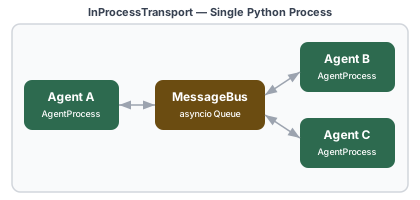
All agents run as asyncio tasks inside one Python process. The InProcessTransport delivers messages via asyncio queues — fast (~2–5 µs per message), zero network overhead.
Install:
topology.yaml:
transport:
  type: in_process

plugins:
  models:
    - type: anthropic
      config:
        default_model: claude-sonnet-4-6

supervision:
  name: root
  strategy: ONE_FOR_ONE
  children:
    - agent:
        name: orchestrator
        type: myapp.Orchestrator
    - agent:
        name: researcher
        type: myapp.Researcher
    - agent:
        name: summarizer
        type: myapp.Summarizer
Run:
When to use Level 1:
- Development and testing
- Workloads that are I/O-bound (LLM calls, API calls) — the GIL doesn't matter
- Demos and quickstarts
- Any deployment where process isolation is not needed
Level 2 — Multi-process (ZMQ)
Scale beyond the GIL. Isolate agent processes on a single machine.
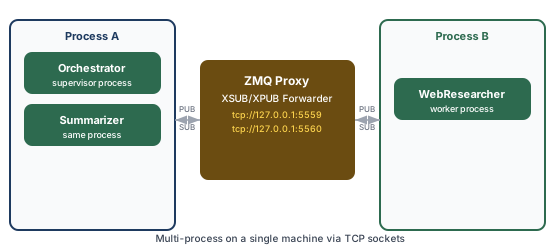
Agents marked process: worker in the topology run in a separate OS process. The supervisor process starts a ZMQ XSUB/XPUB proxy; all other processes connect to it.
Install:
topology.yaml:
transport:
  type: zmq
  pub_addr: "tcp://127.0.0.1:5559"
  sub_addr: "tcp://127.0.0.1:5560"
  start_proxy: true

supervision:
  name: root
  strategy: ONE_FOR_ONE
  children:
    - agent:
        name: orchestrator
        type: myapp.Orchestrator
        # no process: — runs in the supervisor process

    - agent:
        name: researcher
        type: myapp.WebResearcher
        process: worker            # runs in a separate Worker process

    - agent:
        name: summarizer
        type: myapp.Summarizer
        process: worker
Run:
# Terminal 1 — supervisor process (also starts the ZMQ proxy)
civitas run --topology topology.yaml

# Terminal 2 — worker process (connects to the proxy)
civitas run --topology topology.yaml --process worker
Multiple agents can share the same process: name — they all run in one worker. Each distinct process name requires a separate civitas run --process <name> invocation.
When to use Level 2:
- True CPU-bound agents that need to escape the GIL (image processing, local inference)
- GPU agents that require process-level memory isolation (TensorFlow/PyTorch)
- Crash isolation: a runaway agent in one process can't corrupt the memory of others
- Single-machine staging before moving to distributed
Level 3 — Distributed (NATS)
Run agents on multiple machines. Production scale.
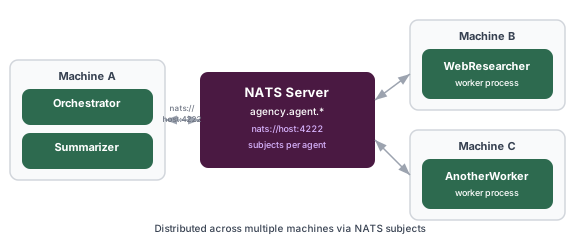
NATS replaces the ZMQ proxy with a cloud-native message broker. Every agent subscribes to its own NATS subject (civitas.agent.<name>). The topology, supervision tree, and agent code are unchanged from Level 2.
Install:
Start NATS:
# Local development
docker run -d -p 4222:4222 -p 8222:8222 nats

# With JetStream (for at-least-once delivery)
docker run -d -p 4222:4222 -p 8222:8222 nats --jetstream
topology.yaml:
transport:
  type: nats
  servers: "nats://localhost:4222"
  jetstream: false               # set true for at-least-once delivery

plugins:
  models:
    - type: anthropic
      config:
        default_model: claude-sonnet-4-6
        max_tokens: 8192
        max_retries: 3

  state:
    type: sqlite
    config:
      db_path: /data/agency_state.db

supervision:
  name: root
  strategy: ONE_FOR_ONE
  max_restarts: 3
  backoff: EXPONENTIAL
  backoff_base: 2.0
  children:
    - agent:
        name: orchestrator
        type: myapp.Orchestrator

    - agent:
        name: researcher
        type: myapp.WebResearcher
        process: worker

    - agent:
        name: summarizer
        type: myapp.Summarizer
Run:
# Machine A — supervisor
civitas run --topology topology.yaml

# Machine B — worker (point --nats-url at your NATS host if it's not localhost)
civitas run --topology topology.yaml --process worker --nats-url nats://nats-host:4222
JetStream (durable subscriptions):
With jetstream: true, agents use durable NATS subscriptions. Messages are persisted in the NATS server and redelivered if a subscriber disconnects. Use this when:
- Agents must not miss messages during a restart or brief network partition
- You need at-least-once delivery guarantees
For most workloads, at-most-once delivery with supervisor-level restart (the default) is sufficient and simpler to operate.
When to use Level 3:
- Agents that need to scale horizontally across machines
- Cloud deployments (Kubernetes pods, ECS tasks, GKE containers)
- High-availability requirements — run a NATS cluster for HA
- Geographic distribution of agent processes
Level 4 — Containerized (Docker Compose)
Generate a ready-to-run Docker Compose stack from your topology.
This reads your topology YAML, inspects the process: assignments, and generates:
Dockerfile— builds an Civitas image with the right transport extrasdocker-compose.yml— one service per process group (supervisor + one per worker name).env— runtime environment variables with placeholders for secrets
  ✔ Generated deployment artifacts

    docker-compose.yml         supervisor + 2 workers
    Dockerfile                 agent image
    .env                       runtime config
    topology.yaml              topology (copied)

    4 agents across 3 containers

  Run with: cd deploy && docker compose up
Example output for a NATS topology:
# docker-compose.yml (generated)
services:
  nats:
    image: nats:latest
    ports:
      - "4222:4222"
      - "8222:8222"
    command: --jetstream
    restart: unless-stopped
    healthcheck:
      test: ["CMD-SHELL", "wget -qO- http://localhost:8222/healthz || exit 1"]
      interval: 5s
      timeout: 3s
      retries: 3

  supervisor:
    build: .
    command: ["--topology", "topology.yaml"]
    volumes:
      - ./topology.yaml:/app/topology.yaml:ro
    restart: unless-stopped
    depends_on:
      nats:
        condition: service_healthy
    environment:
      AGENCY_SERIALIZER: ${AGENCY_SERIALIZER:-msgpack}
      NATS_URL: nats://nats:4222

  worker-worker:
    build: .
    command: ["--topology", "topology.yaml", "--process", "worker"]
    volumes:
      - ./topology.yaml:/app/topology.yaml:ro
    restart: unless-stopped
    depends_on:
      nats:
        condition: service_healthy
      supervisor:
        condition: service_started
    environment:
      AGENCY_SERIALIZER: ${AGENCY_SERIALIZER:-msgpack}
      NATS_URL: nats://nats:4222
Deploy:
cd deploy
# Set secrets in .env before starting
echo "ANTHROPIC_API_KEY=sk-ant-..." >> .env

docker compose up --build
Scale workers horizontally:
Switching between levels
The same agent code runs at every level. Only the transport: block in your topology changes:
# Level 1 — development
transport:
  type: in_process

# Level 2 — multi-process on one machine
transport:
  type: zmq
  pub_addr: "tcp://127.0.0.1:5559"
  sub_addr: "tcp://127.0.0.1:5560"
  start_proxy: true

# Level 3 — distributed, multiple machines
transport:
  type: nats
  servers: "nats://prod-nats:4222"
  jetstream: true
You can also override the transport at runtime without editing the file:
Environment variables
| Variable | Default | Description |
|---|---|---|
AGENCY_SERIALIZER |
msgpack |
Message serializer: msgpack or json |
OTEL_EXPORTER_OTLP_ENDPOINT |
None |
OTEL gRPC endpoint (e.g. http://localhost:4317). Unset = console output |
ANTHROPIC_API_KEY |
None |
Anthropic API key — required when using AnthropicProvider |
OPENAI_API_KEY |
None |
OpenAI key — required when using LiteLLMProvider with OpenAI models |
GEMINI_API_KEY |
None |
Google Gemini key — required when using LiteLLM with Gemini |
NATS_URL |
nats://localhost:4222 |
NATS server URL — overrides transport.servers in topology |
Standard OTEL SDK variables (OTEL_SERVICE_NAME, OTEL_RESOURCE_ATTRIBUTES, etc.) are respected when opentelemetry-sdk is installed.
Never put secrets in topology YAML. The ANTHROPIC_API_KEY and other credentials are read from the environment automatically — no config key needed.
Production checklist
Transport
- NATS is deployed with clustering for high availability
-
jetstream: trueenabled if at-least-once delivery is required -
NATS_URLis set in environment — not hardcoded in topology - NATS monitoring endpoint is reachable (
http://nats-host:8222)
Supervision
-
max_restartsandrestart_windowtuned for expected failure rates -
backoff: EXPONENTIALset on supervisors that talk to external services - Critical agents (orchestrators, state managers) are at the root supervisor level
State
-
SQLiteStateStore(or a custom durable store) configured — notin_memory -
db_pathpoints to a persistent volume (not a container ephemeral filesystem) - State CLI commands tested:
civitas state list,civitas state clear
Observability
-
OTEL_EXPORTER_OTLP_ENDPOINTset and validated against a real backend -
OTEL_SERVICE_NAMEset to identify this deployment in the trace backend - Cost attribution verified: LLM spans carry
llm.cost_usd - Supervisor restart spans visible in trace backend
Secrets
- All API keys are in environment or secret manager — not in topology files
-
.envfile is in.gitignore - Docker secrets or Kubernetes Secrets used in container deployments
Operations
-
civitas topology validate topology.yamlpasses in CI -
docker compose up --scale worker-worker=Ntested for horizontal scale - Graceful shutdown tested:
SIGTERM→runtime.stop()→ spans flushed - Health check endpoint or NATS monitoring is wired to your load balancer or orchestrator
Upgrading between levels
Level 1 → Level 2: Install civitas[zmq]. Change transport.type to zmq. Add process: worker to agents you want isolated. Start a second terminal with --process worker. Agent code: unchanged.
Level 2 → Level 3: Install civitas[nats]. Start a NATS server. Change transport.type to nats, set servers. Run each process group on its own machine (or container). Agent code: unchanged.
Level 3 → Level 4: Run civitas deploy docker-compose --topology topology.yaml. Edit the generated .env with real secrets. Run docker compose up --build. Agent code: unchanged.