Observability¶
Civitas generates OpenTelemetry spans for every message, LLM call, tool invocation, and supervisor event automatically — no instrumentation code required in your agents. This document covers what is traced, how to view it, how to export to external backends, and how to add custom spans.
What is automatically traced¶
Every operation in the runtime emits a span:
| Operation | Span name | Key attributes |
|---|---|---|
| Message sent | send {type} |
civitas.sender, civitas.recipient, civitas.message_type, civitas.message_id |
| Message received | recv {type} |
civitas.sender, civitas.recipient, civitas.message_type, civitas.message_id |
| Agent started | civitas.agent.start |
civitas.agent.name |
| Message handled | civitas.agent.handle |
civitas.agent.name, civitas.message_type, civitas.attempt |
| Agent stopped | civitas.agent.stop |
civitas.agent.name |
| Message retried | civitas.agent.retry |
civitas.agent.name, civitas.attempt |
| Supervisor restart | supervisor.restart |
civitas.supervisor, civitas.child, civitas.restart_count, civitas.strategy, civitas.error |
| LLM call | llm.chat {model} |
llm.model, llm.tokens_in, llm.tokens_out, llm.cost_usd, llm.latency_ms |
| Tool invocation | tool.execute {name} |
tool.name, tool.result_status, tool.latency_ms |
Zero configuration required. Run any Civitas program and these spans are emitted.
Three output modes¶
Civitas selects the output mode automatically based on what is installed and what environment variables are set:
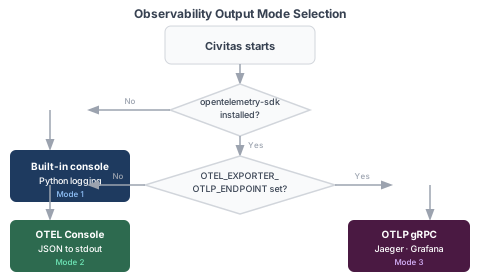
Mode 1 — Built-in console output¶
Default — no dependencies beyond python-civitas core.
When opentelemetry-sdk is not installed, Civitas prints a human-readable summary to the console via Python's logging module at DEBUG level. Enable it:
Output format:
[10:00:00.123] orchestrator -> researcher: research_query
  [llm] claude-haiku-4-5: 1520in/430out $0.0089 2341ms
  [tool] web_search: ok 450ms
[10:00:02.480] researcher -> summarizer: summarize_request
  [llm] claude-haiku-4-5: 890in/210out $0.0003 615ms
[10:00:03.100] summarizer -> orchestrator: reply
This mode is zero-dependency and suitable for development. No spans are exported to any external system.
Mode 2 — OTEL ConsoleSpanExporter¶
Install opentelemetry-sdk, no endpoint configured.
Without OTEL_EXPORTER_OTLP_ENDPOINT set, Civitas configures OpenTelemetry's built-in ConsoleSpanExporter, which writes full OTEL-format JSON spans to stdout. Useful for verifying span structure and attributes before connecting to a real backend.
{
    "name": "llm.chat claude-haiku-4-5",
    "context": {
        "trace_id": "0x4bf92f3577b34da6a3ce929d0e0e4736",
        "span_id": "0x00f067aa0ba902b7"
    },
    "parent_id": "0xa3ce929d0e0e4736",
    "start_time": "2026-04-06T10:00:00.123Z",
    "end_time": "2026-04-06T10:00:02.464Z",
    "attributes": {
        "llm.model": "claude-haiku-4-5",
        "llm.tokens_in": 1520,
        "llm.tokens_out": 430,
        "llm.cost_usd": 0.0089,
        "llm.latency_ms": 2341.2
    },
    "status": "OK"
}
Mode 3 — OTLP export (Jaeger, Grafana, Datadog, etc.)¶
Install opentelemetry-sdk and set OTEL_EXPORTER_OTLP_ENDPOINT.
Civitas uses BatchSpanProcessor which exports spans in a background thread — the message loop is never blocked by network I/O. Spans are buffered and flushed automatically. On runtime.stop(), force_flush() is called to drain any pending spans.
Jaeger (local development)¶
# Start Jaeger all-in-one
docker run -d \
  -p 16686:16686 \
  -p 4317:4317 \
  jaegertracing/all-in-one

export OTEL_EXPORTER_OTLP_ENDPOINT=http://localhost:4317
python examples/research_assistant.py "Compare AI safety approaches"

# Open the trace UI
open http://localhost:16686
In Jaeger you will see a single distributed trace per request, with all agent spans, LLM calls, tool invocations, and supervisor events linked by parent-child relationships — including across process/transport boundaries (e.g. a civitas run --topology supervisor process and a separate Worker process talking over real ZMQ or NATS).
Fixed in v0.9.3 (A1). Before this release, every OTEL span became its own isolated root trace regardless of civitas's own correct internal trace bookkeeping —
Tracernever told the OpenTelemetry SDK which span caused which, so Jaeger/Grafana/Datadog would have shown one disconnected single-span "trace" per operation instead of a real request-flow tree. This was caught and fixed via live verification (a real 2-OS-process ZMQ round trip), not assumed from reading code — seedocs/milestones.md's v0.9.3 entry andcivitas/observability/tracer.py's_otel_parent_context()docstring for the full root cause.
Grafana + Tempo¶
# Start Grafana Tempo (OTLP gRPC on port 4317)
docker run -d -p 4317:4317 -p 3200:3200 grafana/tempo

export OTEL_EXPORTER_OTLP_ENDPOINT=http://localhost:4317
python my_agent.py
Other OTEL-compatible backends¶
Any backend accepting OTLP gRPC works: Datadog (http://localhost:4317), Honeycomb, New Relic, Lightstep, AWS X-Ray via ADOT collector, etc. Set OTEL_EXPORTER_OTLP_ENDPOINT to your collector's gRPC address.
Trace context propagation¶
Trace context flows automatically through every message. You never set trace_id or span_id manually.
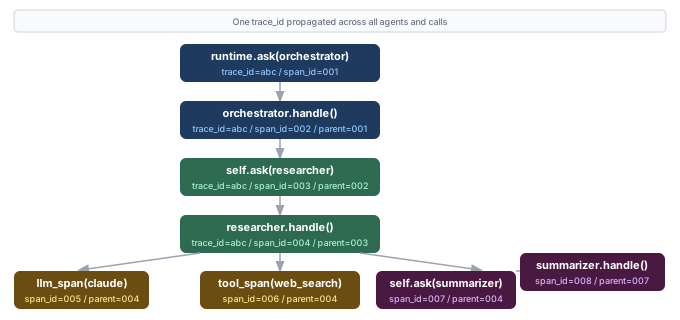
The trace_id is the same for every span in a causal chain. The parent-child relationships (parent_span_id) form the tree structure that OTEL backends render as a waterfall trace. This propagates across process and machine boundaries — spans from a Worker process appear in the same trace as spans from the supervisor process.
Adding custom spans in agents¶
llm_span — context manager¶
Use self.llm_span() to wrap any LLM call. It creates a span parented to the current handle() span and records timing automatically:
class MyAgent(AgentProcess):
    async def handle(self, message: Message) -> Message | None:
        with self.llm_span("claude-haiku-4-5") as span:
            response = await self.llm.chat(
                model="claude-haiku-4-5",
                messages=[{"role": "user", "content": message.payload["question"]}],
            )
            # Enrich the span with response data
            span.set_attribute("civitas.llm.tokens_in", response.tokens_in)
            span.set_attribute("civitas.llm.tokens_out", response.tokens_out)
            span.set_attribute("civitas.llm.cost_usd", response.cost_usd)

        return self.reply({"answer": response.content})
Errors inside the with block are automatically recorded on the span before re-raising.
tool_span — context manager¶
class MyAgent(AgentProcess):
    async def handle(self, message: Message) -> Message | None:
        tool = self.tools.get("web_search")

        with self.tool_span("web_search") as span:
            result = await tool.execute(query=message.payload["query"])
            span.set_attribute("civitas.tool.result_count", len(result["results"]))

        return self.reply({"results": result["results"]})
Custom spans via tracer directly¶
For anything that doesn't fit llm_span or tool_span, use self._tracer.start_span() directly:
class MyAgent(AgentProcess):
    async def handle(self, message: Message) -> Message | None:
        span = self._tracer.start_span(
            "my_custom_operation",
            trace_id=message.trace_id,
            parent_span_id=message.span_id,
            attributes={"my.custom.attr": "value"},
        )
        try:
            result = await do_work()
            span.set_attribute("my.result.size", len(result))
        except Exception as exc:
            span.set_error(exc)
            raise
        finally:
            span.end()   # always end the span

        return self.reply({"result": result})
Always call span.end() in a finally block. Unclosed spans are not exported.
Span attribute reference¶
All Civitas-emitted attributes follow the civitas.* and llm.* / tool.* namespace conventions:
Message spans¶
| Attribute | Type | Description |
|---|---|---|
civitas.sender |
string | Name of the sending agent |
civitas.recipient |
string | Name of the target agent |
civitas.message_type |
string | Value of message.type |
civitas.message_id |
string | UUID7 message ID |
Agent lifecycle spans¶
| Attribute | Type | Description |
|---|---|---|
civitas.agent.name |
string | Agent name |
civitas.message_type |
string | Type of message being handled |
civitas.attempt |
int | Retry attempt number (0 = first delivery) |
Supervisor spans¶
| Attribute | Type | Description |
|---|---|---|
civitas.supervisor |
string | Supervisor name |
civitas.child |
string | Name of the restarted child |
civitas.restart_count |
int | Restart number for this child |
civitas.strategy |
string | ONE_FOR_ONE / ONE_FOR_ALL / REST_FOR_ONE |
civitas.error |
string | Exception that caused the restart |
LLM spans¶
Two genuinely different shapes exist, depending on which API produced the span:
AgentProcess.llm_span() (the ergonomic, per-agent context manager — what real agent code
actually calls, e.g. with self.llm_span("gpt-4o") as span: ...). Span name: civitas.llm.chat.
| Attribute | Type | Description |
|---|---|---|
civitas.agent.name |
string | The calling agent's name (added v0.9.3.x — a real gap: this span carried NO agent identity at all before, in either OTEL export or any storage backend) |
civitas.llm.model |
string | Model identifier (e.g. claude-haiku-4-5) |
civitas.llm.tokens_in |
int | Input token count — only present if the caller reported it |
civitas.llm.tokens_out |
int | Output token count — only present if the caller reported it |
civitas.llm.cost_usd |
float | Estimated cost in USD — only present if the caller reported it |
Tracer.start_llm_span()/end_llm_span() (a lower-level, standalone API called directly on a
bare Tracer, with no AgentProcess/agent context at all — see examples/research_assistant.py).
Span name: llm.chat {model}.
| Attribute | Type | Description |
|---|---|---|
llm.model |
string | Model identifier (e.g. claude-haiku-4-5) |
llm.tokens_in |
int | Input token count |
llm.tokens_out |
int | Output token count |
llm.cost_usd |
float | Estimated cost in USD |
llm.latency_ms |
float | End-to-end call latency in milliseconds |
This API has no agent identity to attach — architecturally, a bare Tracer has no concept of
"current agent" the way AgentProcess does. If you need per-agent attribution with this lower-level
API, add it yourself via span.set_attribute(...).
Tool spans¶
| Attribute | Type | Description |
|---|---|---|
tool.name |
string | Tool name |
tool.result_status |
string | ok or error |
tool.latency_ms |
float | Execution latency in milliseconds |
Error attributes (any span)¶
| Attribute | Type | Description |
|---|---|---|
error |
bool | True if an error was recorded |
error.type |
string | Exception class name |
error.message |
string | Exception message string |
SpanQueue — non-blocking export¶
All span emission from the message loop goes through a SpanQueue. The tracer calls put_nowait() — it never blocks. A background consumer drains the queue and calls the export backend.
If the queue fills up (default: 10,000 spans), the oldest span is dropped to make room. Losing a span is preferable to stalling the message loop. In practice this only occurs under extreme load or if the export backend is very slow.
You do not interact with the SpanQueue directly — it is wired by the runtime.
Custom export backends¶
The ExportBackend protocol has two methods:
class ExportBackend(Protocol):
    async def export(self, spans: list[SpanData]) -> None: ...
    async def shutdown(self) -> None: ...
Example — sending spans to a custom HTTP endpoint:
from civitas.observability.export_backend import ExportBackend
from civitas.observability.span_queue import SpanData
import aiohttp

class HttpBackend:
    def __init__(self, url: str) -> None:
        self._url = url

    async def export(self, spans: list[SpanData]) -> None:
        async with aiohttp.ClientSession() as session:
            payload = [
                {
                    "name": s.name,
                    "trace_id": s.trace_id,
                    "duration_ms": (s.end_time - s.start_time) * 1000,
                    "attributes": s.attributes,
                    "status": s.status,
                }
                for s in spans
            ]
            await session.post(self._url, json=payload)

    async def shutdown(self) -> None:
        pass
Use FanOutBackend to export to multiple backends simultaneously:
from civitas.observability.export_backend import FanOutBackend, ConsoleBackend

backend = FanOutBackend([
    ConsoleBackend(),
    HttpBackend("https://my-collector/spans"),
])
Native span storage: the SpanStore seam (v0.11.0, B4)¶
ExportBackend (above) is the general write contract. A SpanStore extends it for durable,
queryable stores — one protocol that owns both the write side (export/shutdown) and the read
surface (cost_over_time, message_rate_over_time, cost_by_agent/_by_model, recent_spans,
spans_in_trace), so a backend's read and write sides share one schema and can't drift. See
docs/design/spanstore-and-contrib-boundary.md.
Implementations: SQLiteSpanStore + InMemorySpanStore in core; PostgresSpanStore
(civitas-contrib[postgres]) and MySQLSpanStore (civitas-contrib[mysql]) for shared,
cross-process aggregation in one place. All are usable declaratively as plugins.exporters of
type: sqlite/postgres/mysql (see plugins). The
driver-backed stores use a single civitas_spans table (no window files) with DOUBLE epoch
times, so their bucketed queries return identical results to core's SQLiteSpanStore.
normalize_span() is public API (from civitas.observability import normalize_span): it maps a
SpanData's attributes onto the promoted columns (see the normalization table in
telemetry-native.md §4). Every SpanStore imports it rather than
reimplementing the mapping — the returned key set is part of the contract.
InMemorySpanStore (from civitas.observability import InMemorySpanStore) is a dependency-free
reference impl + test double (the telemetry analogue of InMemoryStateStore).
SQLiteSpanStore (v0.9.3.x, Track B)¶
Install civitas[telemetry]. A real, built-in SpanStore for small/local deployments that
want to ask "what did my agents spend last week" without already running Jaeger/Grafana/Tempo:
from civitas.observability.sqlite_backend import SQLiteSpanStore

backend = SQLiteSpanStore(
    db_dir="./civitas_telemetry",  # reasonable default
    window_days=30,                # one SQLite file per 30-day window
    retention_windows=6,           # ~180 days retained; older FILES are deleted outright
)
Back-compat:
SQLiteBackend(write-only name) andSQLiteQueryEngine(read-only name) remain as aliases ofSQLiteSpanStore; existing imports andexporters=[SQLiteBackend(...)]keep working unchanged. New code should useSQLiteSpanStore(or theSpanStoreprotocol).
Used exactly like any other exporter — exporters=[backend] passed to Runtime/Worker, or
declared in topology YAML's plugins.exporters: block, composable with other exporters (e.g. also
forwarding to Jaeger) via FanOutBackend.
Hot fields (agent_name, llm_model, llm_tokens_in/_out, llm_cost_usd) are promoted to real,
indexed SQL columns — cost-per-agent, message-rate, and similar aggregate queries are plain
GROUP BY/SUM(), not per-row JSON parsing. The full attributes dict is also kept
(attributes_json) for drill-down. Retention deletes whole window files, not rows — simpler, no
fragmentation, no risk of a bad WHERE clause corrupting live data.
Scope: single-process only for now — each OS process (Runtime + every Worker) would produce its own separate file set; multi-process aggregation is a deliberately deferred, tracked follow-up (see the design doc's §7 for the sketched answer), not silently unsupported.
Viewing it: SQLiteSpanStore's own query methods provide cost-over-time,
message-rate-over-time, per-agent/per-model cost breakdowns, a recent-span feed (recent_spans),
and per-trace drill-down (spans_in_trace) directly over this store, including cross-window queries
via SQLite's native ATTACH DATABASE. See
civitas telemetry for the live Textual TUI built on top of it
(charts, gauges, and a cost breakdown table — real terminal charts, via textual-plotext).
Environment variables¶
| Variable | Default | Description |
|---|---|---|
OTEL_EXPORTER_OTLP_ENDPOINT |
None |
gRPC endpoint for OTLP export. If unset, falls back to console. |
AGENCY_SERIALIZER |
msgpack |
Serializer for messages: msgpack or json. |
Standard OTEL SDK environment variables (OTEL_SERVICE_NAME, OTEL_RESOURCE_ATTRIBUTES, etc.) are respected when opentelemetry-sdk is installed.
Prometheus metrics (v0.9.3, A2)¶
Separate from tracing (spans, above) — GET /metrics on the HTTPGateway serving a TopologyAgent
(the same component civitas top and civitas topology show already use) exposes real Prometheus
text-format metrics: message rates, latency, errors, restarts, LLM token/cost totals, and current
agent status, all labeled by agent (and model for LLM metrics).
This is the standard Prometheus scrape path — point a scrape_configs target at it directly,
no metrics_path override needed:
# prometheus.yml
scrape_configs:
  - job_name: civitas
    static_configs:
      - targets: ["127.0.0.1:6789"]  # your topology_server node's host:port (its internally-owned gateway)
civitas's own JSON metrics snapshot (used internally by civitas top) lives at GET /snapshot
now instead — /metrics was renamed specifically to make room for the real, standard Prometheus
path (never wise to break ecosystem standards in an OSS project). This is a breaking change to a
previously-documented endpoint; see the v0.9.3 CHANGELOG entry if you were
depending on the old JSON shape at /metrics directly.
Metric reference¶
| Metric | Type | Labels | Meaning |
|---|---|---|---|
civitas_messages_handled_total |
counter | agent |
Messages this agent has handled |
civitas_messages_sent_total |
counter | agent |
Messages this agent has sent |
civitas_message_latency_ms_sum / _count |
counter | agent |
Handling latency sum/count — divide for the average over any time window (Prometheus "summary" pattern; civitas doesn't track real histogram buckets) |
civitas_agent_errors_total |
counter | agent |
handle() errors |
civitas_agent_restarts_total |
counter | agent |
Supervisor-initiated restarts |
civitas_llm_tokens_in_total / _out_total |
counter | agent, model |
LLM token usage — only emitted for agents that have actually made an LLM call |
civitas_llm_cost_usd_total |
counter | agent, model |
The cost-tracking metric — aggregate with sum by (agent) (civitas_llm_cost_usd_total) for per-agent spend, or drop the by clause for total spend |
civitas_agent_status |
gauge | agent, status |
1 for the agent's current status; other status values are simply absent (standard Prometheus enum pattern) |
civitas_runtime_uptime_seconds |
gauge | — | Seconds since this runtime started |
Grafana¶
A ready-made, fully-provisioned Prometheus + Grafana stack ships in
examples/observability/grafana/
(v0.9.3, A3) — docker compose up gives you Prometheus already scraping civitas and Grafana already
showing the dashboard, no manual datasource setup or dashboard import needed. Panels: message
throughput, error rate, LLM cost over time (per agent/model), average latency, agent status, and
at-a-glance totals. See that directory's README.md for the two-terminal walkthrough (run against
examples/dashboard_demo/ for realistic cost/latency/restart data out of the box).
Building your own panels instead: add Prometheus as a Grafana datasource pointed at civitas's
/metrics, then query the metrics above directly — e.g. rate(civitas_messages_handled_total[5m])
for message throughput, or sum by (agent) (civitas_llm_cost_usd_total) for a cost-per-agent bar
chart.
Cost attribution¶
Every LLM span carries llm.cost_usd. Aggregating this attribute by civitas.agent.name in your OTEL backend gives you per-agent cost attribution over time:
orchestrator   $0.0421  (3 LLM calls)
researcher     $0.0089  (1 LLM call)
summarizer     $0.0003  (1 LLM call)
─────────────────────────────────────
Total          $0.0513
The Anthropic provider computes cost from the model's token pricing. The LiteLLM provider uses LiteLLM's built-in cost calculation. Custom providers should populate cost_usd in ModelResponse for this to work.
Tips¶
Jaeger trace not appearing? Check that OTEL_EXPORTER_OTLP_ENDPOINT points to the gRPC port (default 4317), not the HTTP port (4318) or the Jaeger UI port (16686).
Spans not flushed on exit? Ensure await runtime.stop() is called — it calls force_flush() on the OTEL provider. If you Ctrl+C, register a signal handler that calls runtime.stop().
Too much noise in console mode? The built-in console output is at DEBUG level. Set logging.basicConfig(level=logging.INFO) to suppress it while keeping application logs.
Adding trace context to external HTTP calls? Inject message.trace_id and message.span_id as HTTP headers in your tool implementation to continue the trace across service boundaries.