Transports
The transport is the delivery layer underneath the MessageBus. Civitas provides three implementations that form a deployment scaling ladder — from a single Python process to a distributed multi-machine cluster. The same agent code runs at every level; only the topology configuration changes.
The scaling ladder

The agent code is byte-for-byte identical at every level. The MessageBus and Registry interfaces stay the same. Only the transport: block in your topology YAML changes.
Transport protocol
All three transports implement the same Transport protocol:
class Transport(Protocol):
    async def start(self) -> None:
        """Initialize connections, bind sockets."""

    async def stop(self) -> None:
        """Gracefully close connections, flush pending messages."""

    async def subscribe(self, address: str, handler: Callable[[bytes], Awaitable[None]]) -> None:
        """Register a handler for messages arriving at this address."""

    async def unsubscribe(self, address: str) -> None:
        """Remove the handler for an address. No-op if not subscribed."""

    async def publish(self, address: str, data: bytes) -> None:
        """Send a message to an address (fire-and-forget)."""

    async def request(self, address: str, data: bytes, timeout: float | None) -> bytes:
        """Send a message and await a reply."""

    async def wait_ready(self) -> None:
        """Wait for connections and subscriptions to stabilize. No-op by default."""

    def has_reply_address(self, address: str) -> bool:
        """Return True if address is an active ephemeral reply queue."""

    async def wait_subscribed(self, address: str, timeout: float = 2.0) -> None:
        """Block until the subscription for `address` is effective for peers.

        Required for transports with asynchronous subscription propagation
        (e.g. ZMQ PUB/SUB) to avoid publishing into a void right after subscribing."""

    def set_serializer(self, serializer: Serializer) -> None:
        """Replace the serializer this transport uses for its own internal
        request()/reply-address bookkeeping."""
Any class implementing these methods can be used as a transport. See writing a custom transport below.
Level 1 — InProcessTransport
Default for development and single-process deployments.
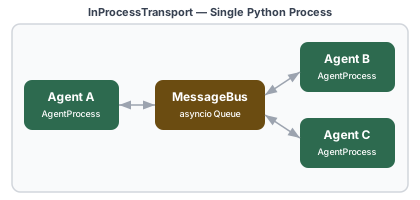
Messages are delivered by placing serialized bytes into the recipient's asyncio queue. Despite being in-process, messages are still serialized through msgpack — this ensures that swapping to ZMQ or NATS never requires changing agent code.
Install: No extra dependencies — included in the core package.
Configuration:
# Programmatic — default, no configuration needed
runtime = Runtime(
    supervisor=Supervisor("root", children=[...]),
    # transport="in_process" is the default
)
Characteristics:
| Property | Value |
|---|---|
| Extra dependencies | None |
| Message latency | ~2–5 µs (serialization overhead) |
| Process boundary | None — same Python process |
| Backpressure | Bounded asyncio queues |
| Request-reply | Ephemeral asyncio queues (in-memory) |
| Fault tolerance | Supervisor task callbacks |
When to use:
- Development and testing
- Single-machine deployments where process isolation is not needed
- All examples in the repo that don't specify a transport
Level 2 — ZMQTransport
Multi-process on a single machine.
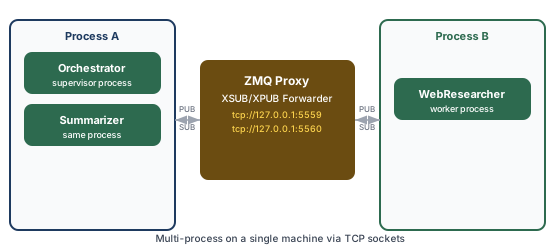
ZMQ uses an XSUB/XPUB proxy to bridge PUB/SUB across OS processes. One process starts the proxy; all other processes connect to it. Request-reply uses ephemeral PUB/SUB topics — the same pattern as InProcess, but over TCP sockets.
Install:
Configuration:
# Programmatic
runtime = Runtime(
    supervisor=Supervisor("root", children=[...]),
    transport="zmq",
    zmq_pub_addr="tcp://127.0.0.1:5559",
    zmq_sub_addr="tcp://127.0.0.1:5560",
    zmq_start_proxy=True,   # start the proxy in this process
)
# topology.yaml
transport:
  type: zmq
  pub_addr: "tcp://127.0.0.1:5559"
  sub_addr: "tcp://127.0.0.1:5560"
  start_proxy: true
Characteristics:
| Property | Value |
|---|---|
| Extra dependencies | pyzmq |
| Message latency | ~50–200 µs (local TCP) |
| Process boundary | OS process (on same machine) |
| Backpressure | ZMQ high-water mark + asyncio queues |
| Request-reply | Ephemeral PUB/SUB topics via proxy |
| Fault tolerance | Heartbeat-based (supervisor pings worker agents) |
When to use:
- Scale beyond the GIL by distributing agents across OS processes
- Isolate agent processes so a crash in one doesn't affect others' memory
- GPU agents that need their own process (TensorFlow/PyTorch process isolation)
- Single-machine staging before moving to distributed
Running multi-process with the CLI
# Terminal 1 — supervisor process (starts the ZMQ proxy)
civitas run --topology examples/multi_process.yaml --process supervisor

# Terminal 2 — worker process (connects to the proxy)
civitas run --topology examples/multi_process.yaml --process worker
The ZMQ proxy
The proxy is a lightweight XSUB/XPUB forwarder. Only one process should start it (start_proxy: true). All other processes connect to the proxy's addresses.
The proxy runs in a background daemon thread. It can handle millions of messages per second and adds negligible latency.
Slow-joiner mitigation: ZMQ PUB/SUB has a brief connection handshake period during which early messages may be dropped. Civitas's wait_ready() introduces a 300ms delay after all subscriptions are registered to mitigate this. For production use, agents should be started before messages are sent — which the Runtime's startup sequence guarantees.
Level 3 — NATSTransport
Distributed across multiple machines.
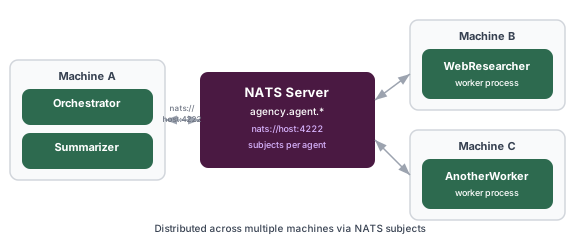
NATS maps each agent address to a subject under the civitas.agent. prefix. For example, an agent named researcher subscribes to civitas.agent.researcher. Request-reply uses the same ephemeral subscription pattern as the other transports.
Install:
Configuration:
# Programmatic
runtime = Runtime(
    supervisor=Supervisor("root", children=[...]),
    transport="nats",
    nats_servers="nats://localhost:4222",
    nats_jetstream=False,
)
Characteristics:
| Property | Value |
|---|---|
| Extra dependencies | nats-py |
| Message latency | ~1–5 ms (network) |
| Process boundary | Machine boundary |
| Backpressure | NATS flow control |
| Request-reply | Ephemeral NATS subscriptions |
| Fault tolerance | Heartbeat-based + NATS reconnection |
| Clustering | NATS cluster for HA |
When to use:
- Agents distributed across multiple machines
- High-availability deployments (NATS clustering)
- Cloud deployments where agents run in separate containers or pods
Starting a NATS server
# Local development — Docker
docker run -d -p 4222:4222 nats

# With JetStream enabled (for durable subscriptions)
docker run -d -p 4222:4222 nats --jetstream
For production, run a NATS cluster. Refer to the NATS deployment docs.
Running distributed with the CLI
# Machine A — supervisor process
civitas run --topology examples/distributed.yaml

# Machine B — worker process (update servers URL to point at your NATS host)
civitas run --topology examples/distributed.yaml --process worker
NATS subject mapping
| Agent name | NATS subject |
|---|---|
researcher |
civitas.agent.researcher |
web_worker |
civitas.agent.web_worker |
_reply.{uuid} |
civitas.agent._reply.{uuid} |
JetStream (durable subscriptions)
With jetstream: true, agents use durable NATS JetStream subscriptions. Messages are persisted in the NATS server and redelivered if a subscriber disconnects and reconnects:
transport:
  type: nats
  servers: "nats://localhost:4222"
  jetstream: true
  stream_name: AGENCY   # default
Use JetStream when: - Agents must not miss messages during a restart or brief network partition - You need at-least-once delivery guarantees
Without JetStream, NATS delivers messages at-most-once. For most agent workloads, at-most-once delivery with supervisor-level retry (via ErrorAction.RETRY) is sufficient and simpler to operate.
Worker processes
At Level 2 and Level 3, agents marked process: worker in the topology run in separate Worker processes. A Worker connects to the broker and hosts agents, but does not manage a supervision tree — that remains in the main process.
# Programmatically launching a worker
from civitas import Worker
from myapp import ResearchAgent

worker = Worker(
    agents=[ResearchAgent("researcher")],
    transport="zmq",
    zmq_pub_addr="tcp://127.0.0.1:5559",
    zmq_sub_addr="tcp://127.0.0.1:5560",
)
await worker.start()
# ... run until shutdown signal
await worker.stop()
The supervisor in the main process monitors worker agents via heartbeats (see Supervision — heartbeat monitoring). When a heartbeat is missed, the supervisor sends a _agency.restart command and the Worker restarts the specified agent.
Switching transports
The same topology — just a different transport: block. Agent code is unchanged.
# Development — single process
transport:
  type: in_process

# Staging — multi-process on one machine
transport:
  type: zmq
  pub_addr: "tcp://127.0.0.1:5559"
  sub_addr: "tcp://127.0.0.1:5560"
  start_proxy: true

# Production — distributed
transport:
  type: nats
  servers: "nats://prod-nats:4222"
  jetstream: true
The only other difference between levels is how you launch processes — via the civitas run CLI with different --process flags or different topology files per node.
Comparison
| InProcess | ZMQ | NATS | |
|---|---|---|---|
| Extra deps | None | pyzmq |
nats-py |
| Process isolation | No | Yes | Yes |
| Machine isolation | No | No | Yes |
| Latency | ~2–5 µs | ~50–200 µs | ~1–5 ms |
| Supervision | Task callbacks | Heartbeats | Heartbeats |
| At-least-once | No | No | Yes (JetStream) |
| HA / clustering | No | No | Yes (NATS cluster) |
| Production-ready | Small workloads | Single-node | Multi-node |
All three transports carry agent-to-agent streaming (AgentProcess.stream()) with no
transport-specific code.
Writing a custom transport
Implement the Transport protocol and pass an instance to Runtime via the components parameter:
from civitas import Runtime, Supervisor
from civitas.components import ComponentSet, build_component_set
from civitas.serializer import MsgpackSerializer

class RedisTransport:
    """Example custom transport backed by Redis pub/sub."""

    async def start(self) -> None:
        self._redis = await aioredis.from_url("redis://localhost")

    async def stop(self) -> None:
        await self._redis.aclose()

    async def subscribe(self, address: str, handler) -> None:
        self._handlers[address] = handler
        # subscribe to Redis channel
        ...

    async def unsubscribe(self, address: str) -> None:
        self._handlers.pop(address, None)
        # unsubscribe from Redis channel
        ...

    async def publish(self, address: str, data: bytes) -> None:
        await self._redis.publish(f"civitas:{address}", data)

    async def request(self, address: str, data: bytes, timeout: float | None) -> bytes:
        # implement ephemeral reply pattern
        ...

    def has_reply_address(self, address: str) -> bool:
        return address in self._reply_queues

    async def wait_ready(self) -> None:
        pass   # Redis connections are immediate

    async def wait_subscribed(self, address: str, timeout: float = 2.0) -> None:
        pass   # Redis pub/sub subscription is broker-side; treat as a no-op

    def set_serializer(self, serializer) -> None:
        self._serializer = serializer

# Wire it via ComponentSet
serializer = MsgpackSerializer()
transport = RedisTransport()
components = build_component_set(transport=transport, serializer=serializer)

runtime = Runtime(
    supervisor=Supervisor("root", children=[...]),
    components=components,
)
The Transport is a structural protocol — no base class to inherit, no registration step. Any class with the right method signatures works.